Recipes for
Agile Governance
in the Enterprise
(RAGE)
THE ENTERPRISE WEB
Kevin Thompson, Ph.D
August 9, 2013
ABSTRACT
The term governance refers to a formalized set of meetings and practices whose purpose is to ensure that the right decisions are made about what deliverables to produce, and how to produce them effectively. Governance becomes complicated for large enterprises, which may contain multiple Business Units and multiple development processes. Thus we will look at how governance can be conducted effectively for Agile and hybrid processes in a large company that develops software applications. We synthesize a case study of a company that implements governance in a variety of effective and explicitly “Agile” ways. We divide levels of governance into Portfolio, Program, and Project levels, and review practices appropriate for each. The key insight is that the bulk of governance can be accomplished by defining and using standard Roles, Ceremonies, Artifacts, Tracking and Metrics, and Governance Points at different levels. Finally, we identify numerous practical recipes for governance, and the Meta-Patterns that apply across them.
CONTENTS
6 REPRESENTATIVE BUSINESS UNITS
6.1 The Training Business Unit
6.2 The Web Store Business Unit
6.3 Common Reporting and Collaboration Structures
7 APPLICATION QUALITY, DEVELOPMENT PROCESS, AND INTEGRATION TESTING
8 GOVERNANCE AT THE PORTFOLIO LEVEL
8.1 Portfolio Governance Process
8.1.2.1 Portfolio Refinement Meeting
8.1.2.2 Portfolio Planning Meeting
8.1.3.1.3 Other Value-Related Factors
8.2 The Training Business Unit
8.3 The Web Store Business Unit
9 GOVERNANCE AT THE PROGRAM LEVEL
9.1 Governance for Development: In the Business Units
9.1.2.1 Release Planning Meeting
9.1.2.2 Scrum-of-Scrums Meeting
9.1.3.1 Definition of Done for the Release
9.2 Governance for Deployment: Across the Business Units
9.2.1 The Waterfall Process Flow
9.2.3 Integrated Release-Management Process
9.2.4 How Handoffs are Accomplished
9.2.6.1 Release Handoff Process
9.2.6.2 Staging Readiness Review Meeting
9.2.6.3 Production Readiness Review Meeting
9.2.6.4 Production Stand-Up Meeting
9.2.6.5 Production Deployment Validation
10 GOVERNANCE AT THE PROJECT LEVEL
10.2 The Training Business Unit
10.2.1 Role Adaptations for Distributed Teams
10.2.2 Conduct of Team Meetings
10.2.3 Conduct of Day-to-Day Work
10.3 The Web Store Business Unit
10.3.1 Role Adaptations for Distributed Teams
10.3.2 Conduct of Team Meetings
10.3.3 Conduct of Day-to-Day Work
10.4 The WebPortal Organization
10.4.1 Conduct of Team Meetings
10.4.2 Conduct of Day-to-Day Work
11.1 Principles of Agile Governance
11.1.1 The Standardization of Recipe Elements
11.1.3 Categories of Governance Points
11.1.4 “Good Enough” is Good Enough
11.2.1 Making Big Things, instead of Little Things
11.2.2 Driving Resource Decisions by Projects, instead of Teams
11.2.3 Separating Estimators from Implementers
11.2.4 Demanding Accuracy of Effort and Schedule Estimates
11.2.5 Demanding Scope on Time
11.2.6 Governance by Committee
11.2.8 Parallelizing Initiatives and Projects
11.2.9 Measuring Progress by Proxy
LIST OF FIGURES
Figure 1 Reporting and Collaboration Structures with Independent Project Management
Figure 2 Reporting and Collaboration Structures with Project Management Inside Engineering Department
Figure 3 Development and QA Environments for Integration Testing during Development
Figure 4 Sample Decision Matrix For Portfolio Planning
Figure 5 Release Plan
Figure 6 Typical Burn-Up Chart
Figure 7 A Typical Waterfall Process for a Telcorp BU
Figure 8 Scrum Process Flow for Releases Involving multiple Business Units
Figure 9 Hybrid Release Management for Scrum and Waterfall Projects
Figure 10 Typical Sprint Schedule
Figure 11 A Typical Definition of Done For a Team's Stories
Figure 12 Decomposition of an Epic into Stories
Figure 13 Scrum Taskboard with Burndown Chart
Figure 14 Example of Kanban Workflow States with WIP Limits
Figure 15 Kanban Board for Deliverables that Have Task Breakdowns
Figure 16 Kanban Board for Tasks
Figure 17 Cumulative Flow Diagram for a Kanban Process
1 INTRODUCTION
The purpose of this document is to provide practical and standardized “recipes” for how to make critical decisions throughout any enterprise that develops software applications, along with guidance for how to develop new recipes when needed. These recipes incorporate Agile principles in ways that enable effective governance in a wide variety of situations, while also recognizing that different organizations can reasonably exercise governance in different ways. Thus our recipes are designed to allow for substantial customization, while still providing enough prescriptive guidance to enable quick adoption.
2 GOVERNANCE
Governance is a term that is widely used but seldom defined. Mel Gill’s has provided one of the few useful definitions of governance:[1]
The processes, structures and organizational traditions that determine how power is exercised, how stakeholders have their say, how decisions are taken and how decision-makers are held to account
Gill lists the critical elements of good governance as
- Creating a vision
- Securing resources
- Defining clear roles and responsibilities
- Establishing benchmarks for performance
- Monitoring the benchmarks
- Accounting to key stakeholders for the organization’s direction and performance
Although Gill developed this conception of governance in the context of non-profit organizations, it is well-suited for wider use. For our purposes, we distill this definition down even further, to say
Governance is the formalization and exercise of repeatable decision-making practices
As organizations grow, so does the need for governance. Small organizations can often function with very informal governance, but are unlikely to grow to large size successfully without some degree of formalism and uniformity. A key challenge that arises when scaling up to a large enterprise is that of managing the tension between the need for well-defined, uniform practices that can be applied widely, and the need for flexibility to handle specific local issues in appropriate ways.
This challenge is commonly best met by providing just enough of the right kind of governance to enable successful collaboration, while avoiding the peril of excessive governance, which becomes an impediment to success.
The introduction of Agile processes (Section 3), primarily in Software Engineering, Information Technology, and other fast-paced, “high-tech” fields, has introduced a new wrinkle in the concept of governance.
Agile processes emphasize rapid adaptation to unexpected change over execution of an existing plan. Agile processes have arisen partly in reaction against governance over-reach, and yet, paradoxically, are themselves highly disciplined. Agile processes have essentially reformulated governance in a fashion that combines a light touch with rigorous enforcement. Agile governance, like Agile processes in general, focuses much more on collaboration than on documentation, and is effective precisely because it involves the spirit of collaboration, not just the form.
The term Agile governance refers to an Agile style of governance, not specifically to the governance of projects that use Agile processes. This is a style of governance that emphasizes rapid decision-making, based on lightweight artifacts that are developed with minimum effort. Thus Agile governance can be exercised for projects that are inherently non-Agile, or which contain a hybrid mixture of Agile and other processes.
We introduce the concepts of Agile governance here through the mechanism of a synthetic case study of a fictitious company, designed to illustrate the variations and common themes that arise in the Agile governance of a large, complex enterprise. It does not attempt to be comprehensive, but does address key issues that arise in most such organizations.
We will see that governance is exercised at identifiable governance points, which are moments at which someone who fulfills a particular Role makes a decision in the domain of that Role’s authority, based on standard practices, metrics, and artifacts.
3 THE MEANING OF AGILE
The term Agile reflects the philosophy of the Manifesto for Agile Software Development (commonly called the Agile Manifesto), which states:[2]
We are uncovering better ways of developing
software by doing it and helping others do it.
Through this work we have come to value:
Individuals and interactions over processes and tools
Working software over comprehensive documentation
Customer collaboration over contract negotiation
Responding to change over following a plan
That is, while there is value in the items on
the right, we value the items on the left more.
It should be noted that there is nothing inherent in these principles that tie the manifesto to software development in particular, other than the statement regarding the value of “working software.” Replacing the latter phrase by “product” or “deliverable” retains the philosophy while extending the scope of the Manifesto to a much wider world.
For our purposes, we can say in addition that Agile processes are processes that incorporate the principles of the Agile Manifesto, and are designed to adapt well to uncertainty and unexpected changes. Common Agile processes include Scrum[3] and Kanban[4], which figure prominently in this document.
4 THREE LEVELS OF GOVERNANCE
The Project Management Institute defines three primary levels of granularity for the work of an organization: Portfolio, Program, and Project. With minor modifications, these definitions are applicable to the governance of an Agile world as well[5], and so we introduce the following terminology.
Programs contain projects, while portfolios contain programs, projects, or a mix of both.
A Project is a temporary endeavor undertaken to create a unique product, service, or result. [PMBOK4][6].
A Program is comprised of multiple related projects that are initiated during the program's life cycle and are managed in a coordinated fashion. The program manager coordinates efforts between projects but does not directly manage the individual projects. [SProgMan2][7]
A Portfolio is a collection of projects or programs and other work that are grouped together to facilitate effective management of that work in order to meet strategic business objectives. The projects or programs of the portfolio may not necessarily be interdependent or directly related. [SPortMan2][8]
Given these definitions, the management of these entities can be defined as follows:
Project Management is the application of knowledge, skills, tools, and techniques to project activities to meet the project requirements. [PMBOK4]
Program Management is the centralized coordinated management of a program to achieve the program's strategic objectives and benefits. It involves aligning multiple projects to achieve the program goals and allows for optimized or integrated cost, schedule, and effort. [SProgMan2]
Portfolio Management is the coordinated management of portfolio components to achieve specific organizational objectives. [SPortMan2]
Less formally, we might say that Project, Program, and Portfolio Management operate at tactical, strategic, and business levels, respectively. Project Management is about doing work correctly, while Portfolio Management is about selecting the correct work for the business to do. Program Management is the layer in between, which addresses the integration of tactical work (projects) into strategic (program-level) deliverables.
It should be noted that changes in business environment may result in the cancellation of projects or programs that no longer represent appropriate investments for the business. A well-functioning portfolio-management process can be expected to terminate programs or projects that are successful by their own objectives, but which have ceased to represent the best investment of the company’s resources.
The strict interpretation of the above definitions for “project” and “program” do not apply readily to an Agile world, where the perspective is about how a set of Teams collaborates to build and enhance products steadily over time. However, the concept of a hierarchical organization of work is definitely relevant, so we will think of the hierarchy in these terms here:
- The Project level refers to the work of a single Team
- The Program level refers to the collaboration between Teams
- The Portfolio level refers to the development and management of business initiatives that lead to program- and project-level work
Governance is important at all levels. We will address governance for Agile processes, but not for plan-driven (e.g. Waterfall) processes, at the project level. At the program level, where the distinction between Agile and plan-driven processes starts to blur, we address governance for Agile and hybrid processes. Finally, Portfolio planning and monitoring strongly resembles the Agile perspective by default, and governance at that level can easily be described in Agile terms.
5 THE COMPANY
TelCorp is a major manufacturer of medical devices, used primarily in hospitals to support surgical procedures and patient monitoring. The company is organized along major product lines, one per Business Unit (BU), and each BU has Profit-and-Loss responsibilities for its products. Some BU’s focus on product development, while others focus on related offerings such as service, support, training, sales, and so forth.
The company provides a Web portal that is divided into three major areas:
1) The corporate Web site, which provides information about the company, its market, and its technologies
2) An eCommerce site, through which customers can place orders for standard products, and for customized solutions for which the company provides configuration and installation services. Orders flow from this site through a fulfillment process, and the site tracks order status and provides status information to purchasers.
3) A Technical Support site, which funnels all help requests regarding purchased products to appropriate support organizations in the company
The TelCorp WebPortal Organication (WPO) owns the Web portal, and is responsible for deploying, supporting, and trouble-shooting the portal. WPO must cope with several challenges, such as
- Most applications are developed by other Business Units, not by WPO, so WPO does not control the development of those applications
- Many critical user actions initiate end-to-end processes that span multiple applications created by different business units
- Each Business Unit manages and funds its own portfolio of projects
WPO own three major computing environments:
- The Production environment, which hosts the applications used by its customers
- A Staging environment, which is used to validate new releases of the complete site just prior to Production deployment
- A Performance environment, which is used to test applications under realistic but simulated loads
While WPO does not control the development process for most of the applications, it does control the deployment process, and can set and enforce standards around deployment and final testing of applications.
The Vice Presidents and other key business stakeholders of the various business units share a common desire to make the lead time from request of a feature to its production deployment as short as possible. The development process and associated governance practices have all been designed with this overriding goal in mind. Achieving this goal in such a large organization is not a trivial process, and requires substantial investment in people, processes, tools, and environments in order to make it happen.
In the following sections, we will examine the flow of decisions and work associated with feature development in representative TelCorp Business Units, and observe how this work may be structured to enable quick turnaround of requests, while satisfying the constraints associated with an enterprise-scale, multi-application world.
6 REPRESENTATIVE BUSINESS UNITS
The various Business Units at TelCorp operate differ in many respects, but do follow common governance practices that are tailored to meet their specific needs. We will introduce some typical Business Units in this section, and drill into the details of how they operate in later sections.
6.1 The Training Business Unit
The Training Business Unit is responsible for product-related training. It provides several hundred classes per year, at dozens of locations around the world. The Classes listed in the Web site are provided either by company personnel, or by authorized business partners. The Training BU also develops several Web applications that support course registration and other customer-related interactions, which are hosted in the WPO production environment, and thus made available through the company’s Web site.
Training’s development work is done by ten Scrum Teams. The requirements for these Teams are developed by four Team Product Owners, while the work of implementing requirements is done by the Teams, and facilitated by four ScrumMasters who are paired 1:1 with the Product Owners. Each Product-Owner / ScrumMaster pair works with either two or three Teams.
Overall guidance on requirements is provided by one Area Product Owner. The Area Product Owner works closely with key business stakeholders and customer representatives to set the direction of product development. The Team Product Owners report directly to the Area Product Owner, who works with them to define requirements which the Team Product Owners turn into the implementable specifications used by the development Teams.
A single Agile Program Manager provides oversight and facilitation for all development done in the Web Store BU. The Program Manager is the functional manager of the ScrumMasters. The Program Manager works closely with the ScrumMasters to maintain situational awareness, identify and mitigate big-picture risks, facilitate cross-team meetings, and monitor and facilitate cross-team dependencies and issue resolution.
The Area Product Owner and Agile Program Manager report to Training’s Vice President.
6.2 The Web Store Business Unit
The Web Store BU is typical, in terms of how it prioritizes, plans, and executes development work whose output flows to the company Web site. Web Store provides content and capabilities related to online sales of products to end users, who are typically departments within hospitals that already own similar products and do not need much in the way of sales support.
Overall guidance on requirements is provided by two Area Product Owners, who work closely with key business stakeholders and customer representatives to set the direction of product development.
- The Store Area Product Owner focuses on the user-facing functionality of the store, and the core capabilities (such as catalog management, inventory, and shipping) required to provide this functionality.
- The Back-Office Area Product Owner focuses on reporting, analytics, and accounting functions required to support internal business operations.
Web Store’s development work is done by fifteen Scrum Teams, of which ten support the Web Store capabilities, and five support the Back-Office capabilities. The requirements for these Teams are developed by six Team Product Owners (four for Store, two for Back Office), who take direction on requirements from the Area Product Owners. The Area and Team Product Owners all report to the Director of Product Marketing.
The work of implementing requirements is done by the Teams, and facilitated by ScrumMasters who are paired 1:1 with the Team Product Owners. Each Product-Owner / ScrumMaster pair works with two or three Teams.
Two Agile Program Managers provide oversight and facilitation for all development done in the Web Store BU. Program Managers pair 1:1 with Area Product Owners (must as ScrumMasters do with Team Product Owners) and share the same focus on Store or Back-Office work.
The Program Managers work closely with the ScrumMasters to maintain situational awareness, identify and mitigate big-picture risks, facilitate cross-team meetings, and monitor and facilitate cross-team dependencies and issue resolution.
The Program Managers and ScrumMasters report to the Director of the Web Store Project Management Office (PMO), and are considered members of the PMO.
The Product Marketing and PMO Directors both report to the Web Store’s Chief Operating Officer.
6.3 Common Reporting and Collaboration Structures
While the details of reporting structures vary widely across Business Units, there are common patterns. Virtually all of the structures seen in practice are represented in Figure 1 and Figure 2. In these figures, solid lines represent relationships that are both reporting and collaborative, while dashed lines are relationships that are collaborative, and may or may not indicate reporting relationships, depending on local organizational decisions.
Figure 2 differs from Figure 1 in that the Project and Program Management roles (ScrumMaster and Program Manager) have different reporting relationships. In Figure 1 these roles report to the PMO, while in Figure 2 they report to the Director of Engineering.
The abbreviations in the figures have the following meanings:
PgM: Program Manager
PMO: Project / Program Management Office
APO: Area Product Owner
PMM: Product Management & Marketing
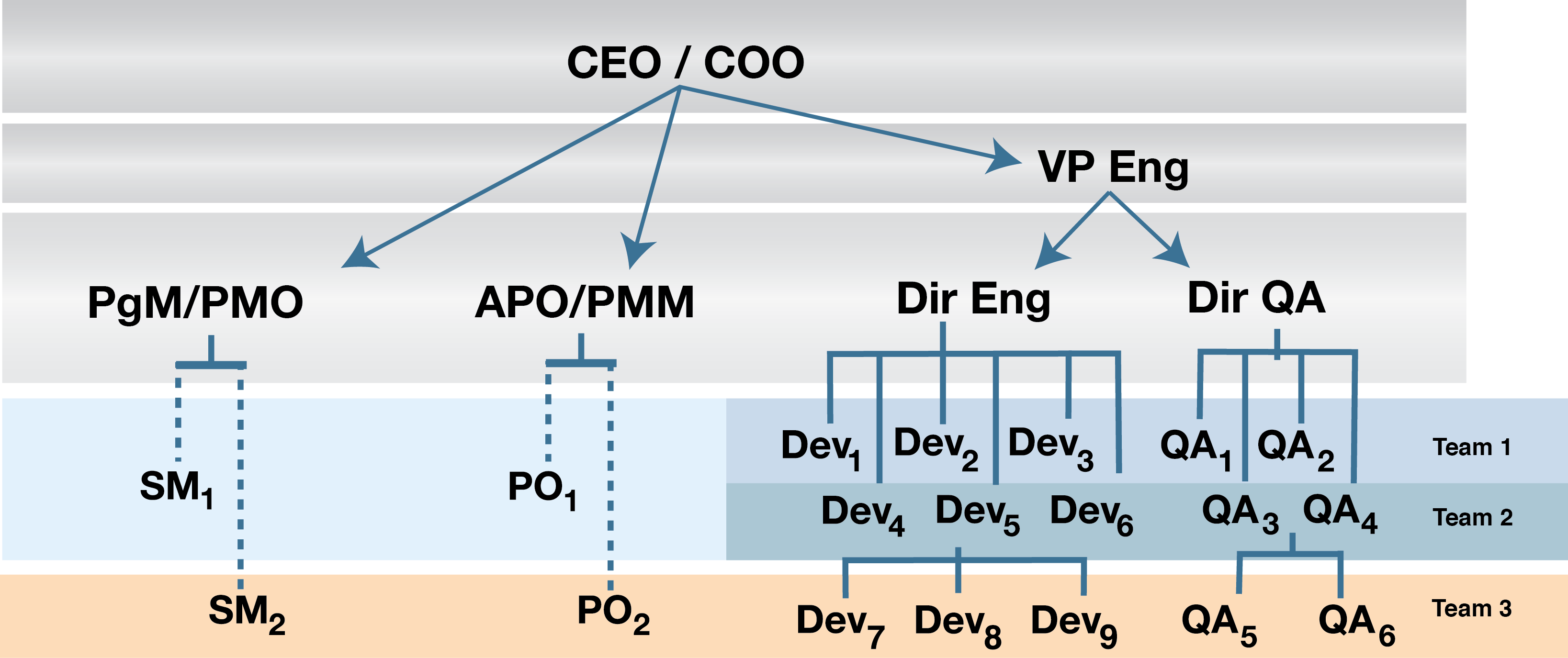
Figure 1 Reporting and Collaboration Structures with Independent Project Management
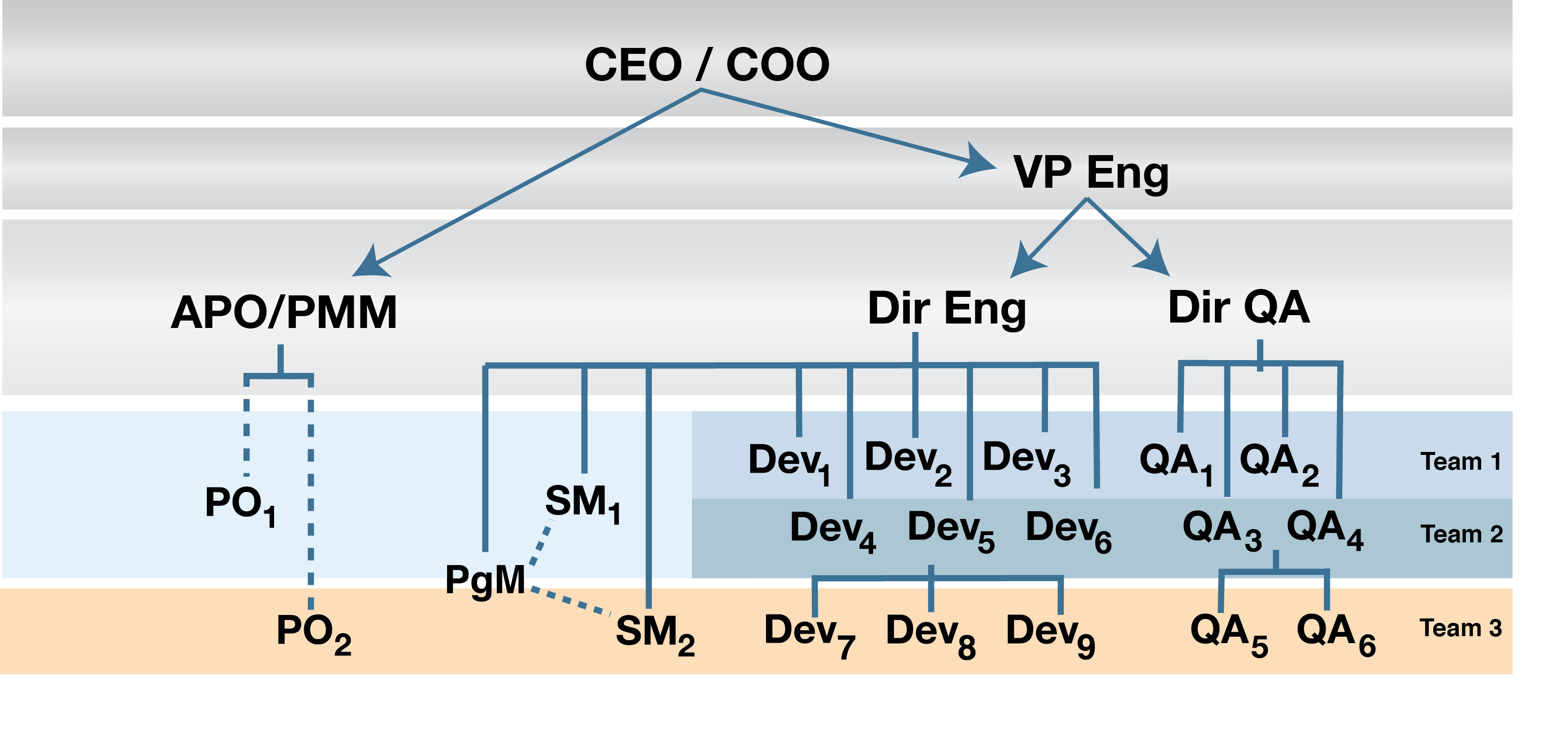
Figure 2 Reporting and Collaboration Structures with Project Management inside Engineering Department
7 APPLICATION QUALITY, DEVELOPMENT PROCESS, AND INTEGRATION TESTING
The greatest challenge application developers face, with respect to testing, is the fact that applications developed by one BU coexist and interact with other applications developed by other BU’s, in a large ecosystem that none of the BU’s controls individually. This ecosystem is the Production environment, which is managed by the WebPortal organization.
The interfaces between applications change over time, and dependent applications must be revised when the interfaces on which they depend are changed. It is therefore impossible to test any one application fully without conducting end-to-end tests of the set of interconnected applications.
In organizations that follow Waterfall development processes, cross-application dependencies tend to lead to lengthy integration-testing phases prior to Production deployment. It is not uncommon for integration testing to last as long as four months in a large enterprise, a factor that greatly impairs the ability to react effectively to changing business needs.
The only way to avoid lengthy integration testing in a dedicated pre-Production phase is to do the integration testing during development, rather than waiting until a “code freeze” moment at the end of a monolithic development project.
Conducting integration testing during development is challenging because the applications are “moving targets,” and because the testing environments can be expensive to create and maintain. Nevertheless, there is no reasonable alternative if the goal is to eliminate lengthy pre-Production test cycles.
The following diagram illustrates how integration testing may be done during development, i.e. on demand, and daily, in a Scrum process.
We will suppose that Business Unit “A” produces a variety of applications, including application A. Business Unit “B” also produces a variety of applications, including application B. Applications A and B depend on each other, such that testing the functionality of one requires that the other be present and available for use by the other.
We will need separate Development and QA environments for this scenario. However, the need for application B to be stable enough for application A to use it for testing, and vice versa, requires that the QA environment host stable (working) versions of all applications.
The Development environments may be personal computers used by individual Team members (e.g., for Web-application development), or shared environments (e.g., for ERP system development). In either case, the Development environment used by a person or Team in Business Unit A hosts application A, and interfaces to other applications, on which it depends, which reside in the QA environment. Thus the Team members can execute functionality in application A at any time, relying on linked applications in the QA environment as required.
Business Unit B has a similar arrangement, and the general strategy is depicted in Figure 3.
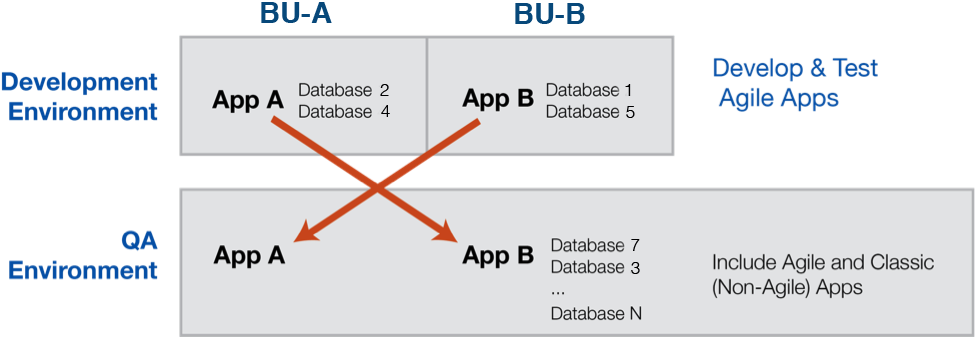
Figure 3 Development and QA Environments for Integration Testing during Development
The applications in the Development environment are updated frequently (as often as several times per day) as new features and bug fixes are completed. After each such update, the new functionality must be tested immediately. A reasonable approach is to execute the specified acceptance tests for application A in the Development environment, and have application A use the instance of application B in the QA environment.
Development on application B likewise relies on the version of application A in the QA environment.
When a new and reasonably stable version of application A becomes available (which must be at least once per week, and as often as daily), it is deployed into the QA environment, where it is re-tested to confirm that the new capabilities still work. Application B will then use the new instance of A for its testing, and vice-versa. Final acceptance tests for recently-developed features, or even full regression suites, may be re-run every time a new version of an application is deployed to the shared QA environment.
Ideally, even applications produced by BU’s using a Waterfall process should also be present in the shared QA environment.
It may be the case that not all applications or services provided in the Production environment can be provided in the shared QA environment, or that linked applications perform too slowly for real-time interactions to be testable in a practical sense. If this is the case, the fallback option is to create mock objects that simulate the missing pieces. Mock objects provide a practical alternative to real services, but create a need for subsequent integration testing (as the objects are imperfect simulations of the systems they represent), and also create an ongoing maintenance burden (as the systems the objects represent evolve over time).
8 GOVERNANCE AT THE PORTFOLIO LEVEL
Agile processes (as opposed to projects) have a default world-view in which the work of Teams continues without end, and contributes a steady flow of new capabilities to an existing product. In other words, the focus is on the product and the process, rather than on a project. It is easy to see why this is so, when reviewing the definition of project from the Project Management Institute:
A Project is a temporary endeavor undertaken to create a unique product, service, or result. [PMBOK4].
Its finite lifespan makes a project conceptually different from a product, as a product is enhanced steadily over an unbounded time by the deliverables of an Agile process. However, the need to manage portfolios (i.e., make strategic decisions about where to invest effort in producing major new capabilities) applies to an Agile, product-oriented world just as much as it does to a classic, project-oriented world.
8.1 Portfolio Governance Process
Portfolio governance entails two major activities: Making decisions about what initiatives to execute or fund, and making decisions about whether or how to continue work on initiatives that are already in progress. All Business Units follow the same general approach to Portfolio-level governance, although the terminology and details vary somewhat across BU’s.
8.1.1 Roles
The Roles of Portfolio Owner, Area Product Owner, and Program Manager are clearly defined, as are the responsibilities and areas of authority associated with each.
Portfolio Owner: This Role has authority over initiative selection and prioritization. Most Business Units have only one Portfolio Manager (who often has VP or COO as a job title). Responsibilities include
- Reviewing Business Cases for initiatives (usually developed by Area Product Owners)
- Setting priorities (and sequencing) of initiatives
- Making decisions about whether to carry out, re-prioritize, or cancel initiatives
Area Product Owner: The sole authority over product requirements for the product,[9] and the intended content of the Release. Responsibilities include
- Working with customers and stakeholders to identify needs, solutions, and business value.
- Working with Team Product Owners to develop sufficient detail about requirements and cost (based on development and testing effort) to support useful ROI estimates.
- Develop Business Case for Product Releases, for use in Portfolio planning.
- Monitor changes in business needs, and work with Team Product Owners to revise the planned Product Release content as needed.
- Provide ongoing guidance to Team Product Owners regarding cross-Team priorities and tradeoffs.
Program Manager: Works closely with Teams’ ScrumMasters or Project Managers to ensure that cross-Team collaboration is effective in achieving the Product’s Release goals. Responsibilities include
- Enforcing agreements on how cross-Team collaboration is done
- Facilitating cross-Team meetings
- Monitoring cross-Team dependencies, and ensuring that these are planned and addressed effectively
- Assessing impact of development issues and scope changes on cross-Team dependencies and overall execution
- Monitoring progress of the Product Release
- Ensuring that risks are addressed effectively during planning and execution
- Removing obstacles to effective cross-Team collaboration
8.1.2 Ceremonies
Ceremonies are recurring meetings with specific and standardized agendas and practices. Each ceremony has a particular purpose, as described below.
8.1.2.1 Portfolio Refinement Meeting
Portfolio Refinement refers to the process of developing a Business Case (Section 8.1.4). While the Area Product Owner is responsible for this development, the artifact itself evolves through stages.
The critical elements of the Business Case are estimate of value and estimate of effort for the initiative under consideration. The estimate of value requires an assessment of market issues, and is primarily the domain of the Area Product Owner, but the estimate of effort ultimately derives from the development organization.
In the Portfolio Refinement process, the Area Product Owner completes a first draft of the Business Case, and then holds an initial Portfolio Refinement Meeting. This meeting typically includes the Area Product Owner, and relevant Team Product Owners and Program Manager(s). Attendees provide their insights regarding clarity and content, which may lead to revision of the Business Case. They also provide what insights they can regarding the (very rough) estimate of effort required to implement the initiative.
If the Program Manager believes that Team-level insight is required to provide adequate estimates, he may follow up separately with the ScrumMasters and Team Members to refine the estimate. However, no attempt is made to provide a precise estimate at this point (and indeed, a precise estimate is not possible, given the summary-level specifications in the Business Case).
Subsequent Portfolio Refinement Meetings are held as needed, either to refine the same Business Case, or to refine new Business Cases.
8.1.2.2 Portfolio Planning Meeting
The Portfolio Owner commonly facilitates this meeting, as well as providing the final decision regarding proposed or in-process initiatives. Area Product Owners must have provided their Business Cases, including value and effort estimates, prior to this meeting, and the Portfolio Owner will have incorporated this information into a decision matrix (Section 8.1.4.3) for review in the meeting.
In the meeting, Area Product Owners describe their Business Cases, and members discuss each initiative to improve their understanding. The discussions may lead to revisions of value estimates, in which case the Portfolio Owner updates the decision matrix accordingly.
The agenda is as follows:
- All review status of initiatives currently in process, and the Portfolio Owner makes continuation / termination decisions based on current understanding of the initiatives’ value and business needs.
- Area Product Owners describe their new Business Cases, and members discuss them to improve their understanding. The discussions may lead to revisions of value estimates, in which case the Portfolio Owner updates the decision matrix accordingly.
- The Portfolio Owner or Area Product Owners may choose to defer decisions about some Business Cases that need revision
- The Portfolio Owner decides which initiatives to add to the Portfolio Backlog, basing their rank on the decision matrix.
- All attendees discuss when next initiative(s) should be started, based on when Teams will have bandwidth to start new work. The Portfolio Owner may revise ranking of new or ongoing initiatives at any time, but tries to enforce sequential (rather than parallel) implementation of initiatives in order to maximize throughput.
- (Optionally) For a particular initiative, either the Area Product Owner, or the Portfolio Owner, may request that a Release Plan be created for it, if the need for decisions about timing justifies the substantial work of creating the Release Plan. This information may be reviewed in a subsequent meeting, or used off-line prior to that meeting.
8.1.3 Artifacts
The following artifacts are widely used in this process.
8.1.3.1 Business Case
A Business Case is a description of an initiative (or project). The initiative should comprise a well-defined set of deliverables, which the Business Case describes at a summary level. The Business Case also includes high-level estimates for the business value provided by the initiative, and the effort required to implement the initiative.
When developed in the context of an Agile process, the Business Case includes an Agile Charter (Section 8.1.4.2) that describes the initiative, along with the value and effort estimates.
Estimates of value and effort are highly uncertain. These estimates should be understood as “ROM” estimates (“Rough order of Magnitude”). They are useful for making portfolio decisions, but may easily be off by a factor of three or more from the ultimate, actual values. The wide discrepancy between estimates and actuals does not reflect a lack of competence, but is an unavoidable reality that reflects the limitations on what can reasonably be known at the time the estimates are developed. Accurate estimation is impossible, because there are always too many “unknown unknowns” at this stage.
All quantitative factors relevant to portfolio decisions are mapped to coarse scales that contain only a few allowed values. This is done to avoid futile but time-wasting attempts to get “good” numbers, and makes Portfolio planning a relatively quick process.
Possible scales include
Linear Scale: 0, 1, 2, 3, 4, 5
Fibonacci Scale: 0, 1, 2, 3, 5, 8
Doubling Scale: 0, 1, 2, 4, 8, 16
Different Business Units choose different scales, based on how much variation they anticipate in effort across the initiatives they must evaluate, but no BU uses a scale with more than six values.
8.1.3.1.1 Effort Estimates
Effort estimates are not provided in real-world units (such as “person-days”), but mapped to one of the coarse scales described above.
Some Business Units attempt to map the coarse-scale values to a range of true effort values. Others select (say) six previous “reference initiatives” of different known size, and associate one with each scale value to effectively define what that value means. Still others do neither, and go with a simple “gut feel” for values that they do not bother to define, but which they find works well enough in practice.
8.1.3.1.2 Revenue Estimates
How revenue is estimated varies from one Business Unit to the next. Possibilities include
- Net Present Value calculations, which reflect revenues accumulated over time
- Total estimated value, which reflect single, lump-sum payments
- Gut feel about relative size of expected revenues for different initiatives
However revenue is estimated, the result is mapped to the same kind of scales used in effort estimation (above), for use in comparing initiatives.
8.1.3.1.3 Other Value-Related Factors
Business Value can depend on more than revenue. Initiatives may bring value in the form of new relationships, the opening of new opportunities, entry into new markets, risk reduction, regulatory compliance, and so forth. Business Units may define as many of these additional factors as they wish, and always map them to the same kind of coarse-valued scales used for effort and revenue.
8.1.3.2 Agile Charter
An Agile Charter is a short document that includes
- A Product Vision: A paragraph summarizing what the product (initiative) is, which describes
- Who will buy and use the product?
- What customer needs will the product address?
- What category is the product in?
- Which attributes must the product have to address key customer needs selected, which are critical for the success of the product?
- How does the product compare against existing products? What are the product’s unique selling points?
- A Mission Statement: A paragraph summarizing what the organization or enterprise will do with the product
- Success criteria: Quantitative metrics about revenue (such as ROI, NPV, etc.), market share to be achieved, and so forth, against which performance can be measured
8.1.3.3 Decision Matrix
A decision matrix computes a priority value as the ratio of a weighted sum of value-related factors to the effort required to implement the initiative.
|
FACTOR |
NET PRESENT VALUE | REGULATORY COMPLIANCE | COST OF NOT DOING | TECHNICAL RISK | URGENCY | EFFORT | WEIGHTED SUM | PRIORITY | |
| Weight | 1 | 1 | 0.5 | 0.5 | 0.5 | ||||
| INITIATIVE | A | 1 | 5 | 8 | 0 | 1 | 8 | 10.5 | 1.31 |
| B | 3 | 3 | 3 | 2 | 8 | 1 | 12.5 | 12.50 | |
| C | 5 | 2 | 5 | 5 | 3 | 5 | 13.5 | 2.70 | |
| D | 8 | 1 | 2 | 3 | 2 | 2 | 12.5 | 6.25 |
Figure 4 Sample Decision Matrix for Portfolio Planning
The example in Figure 4 shows the weights associated with five factors, namely,
- Net Present Value: Computed from an estimate of revenues over time
- Regulatory Compliance: Importance of regulatory issues
- Cost of not Doing: Degree of harm (lost revenue, fines, etc.) if initiative is not done
- Technical Risk: Higher risks should be addressed earlier, to avoid surprises at late dates
- Urgency: How time-critical the initiative is
The higher the priority, the sooner the initiative should be started. For the example, which uses a Fibonacci scale for all factors, initiatives should be done in the order B, D, C, A, which is quite different from an order driven solely by NPV (which would be D, C, B, A).
The selection of factors, weights, and scales for value and effort is left to each Business Unit, but all of them use this general approach to making portfolio decisions.
8.1.3.4 Portfolio Backlog
The Portfolio Backlog is the set of initiatives that have been defined to some extent, and for which implementation has not yet begun. The Business Cases for these initiatives may be in any state of development (from not started through completed). The complete set of initiatives is generally divided into two rough bins, one for those with little detail, and one for which Business Cases and priorities have been developed. Different Business Units imposed varying degrees of structure and formalism on the Portfolio Backlog, but all use the term and the basic concepts.
8.1.4 Tracking and Metrics
The only standard for tracking initiative progress is the Burn-Up Chart, of Section 9.1.4, but applied for specific initiatives, rather than Releases. The relationship between initiatives and Releases is not straightforward, as one Release may include contributions from multiple initiatives, and one initiative’s deliverables may span more than one Release. However, one can always treat an initiative as an Epic (Section 10.1.1.3.2), and track progress towards its completion, provided the links between the initiative’s Epic and the Stories comprising it are maintained.
8.1.5 Governance Points
Governance is exercised in a variety of ways, by different people at different points. Table 1 summarizes the Portfolio-Level governance points.
|
WHEN |
PARTICIPANTS | DECISIONS AND ACTIONS |
| Portfolio Refinement Meeting | Area Product Owner, Team Product Owners, Program Managers | Area Product Owner gets feedback on quality and completeness of Business Cases. Program Manager provides effort estimate, but often after follow-up consultation with ScrumMasters and Scrum Teams. |
| Portfolio Planning Meeting | Portfolio Owner, Area Product Owners | Each Area Product Owner describes Business Cases for initiatives. All discuss to clarify understanding, and possibly adjust estimates. Portfolio Owner adds items to Decision Matrix, makes decisions about whether / when to start new initiatives. Portfolio Owner may also decide to terminate ongoing initiatives. |
Table 1 Portfolio-Level Governance Points
8.2 The Training Business Unit
The Training BU uses the term “Project” for the business initiatives in its Portfolio. The majority, if not all, of the Projects in the BU’s Portfolio are developed by the Area Product Owner, who is responsible for setting project direction.
8.2.1 Funding Decisions
Each Project in the Portfolio is described by a one-page Business Case. The Business Case includes a Product Vision, an estimate of value to the business (including the schedule for which the value is expected to be realized, via Net Present Value estimation); an estimate of the development effort; and a description of how the Project’s progress will be tracked. The NPV and effort values are both mapped to a six-valued doubling scale ranging from 0 to 16, and the priority value is simply the ratio of NPV to effort.
The items in the Portfolio very nearly represent Projects in the classic sense. Each item is time-limited, defines the scope to be developed, and includes an estimate of the cost. Items that receive approval are funded individually, with funds earmarked for that specific Project.
The Portfolio items depart from the classic Project perspective during execution. The classic model assembles a project team to do the work of the project, and then disbands the project team afterwards. However, this model is highly disruptive and detrimental to productivity, so the Training BU instead maintains stable Team definitions, where each Team has a specific product-area focus and a slowly-evolving membership. Project funding does flow through to pay for the work of the Teams, but this is essentially a book-keeping exercise, as the Teams experience no discontinuities in their funding or flow of work. Instead, funding and business requirements flow smoothly to the Teams, without interruption, independent of the originating Project at the Portfolio level.
Funding decisions are made at the monthly Portfolio Planning Meeting, attended by the Portfolio Review Committee. The Committee consists of the Area Product Owner, the Program Manager, the Vice President of Training (who fills the Portfolio Manager role), and other relevant stakeholders, some of whom also propose Projects. The Committee discusses the pros and cons of different Projects in the Portfolio, and decides which Projects will be launched in the next few months. Work begins on a new initiative with the highest priority when the first relevant Team has the capacity to start the work.
8.2.2 Monitoring
The monthly meeting of the Portfolio Review Committee also reviews the status of Projects that are in development. The review examines cost, performance, risk, and value realization to decide whether to continue, modify, or cancel Projects. The Committee examines metrics such as
- Red-Yellow-Green status:
- Green means the planned scope appears to be achievable. The rate of progress projected over the remainder of the Release cycle crosses the scope line before the end-of-Release date.
- Yellow means the planned scope may not be achievable, because, for example, the projected level of work remaining on uncompleted Stories at the current moment exceeds 20% above the Team’s remaining capacity in the Release cycle.
- Red means the Release goal is at high risk of not being met, either because the Burn-Up chart is outside the 20% control limit of the yellow state, or a specific critical risk factor has arisen (e.g., the Product Owner has been injured and will be unable to return to work for several weeks, and so cannot supply specifications for the Teams to implement).
- Predictive Burn-Up Chart, which shows estimated time of completion of the current concept of scope, along with the scope-change history.
- For Production Releases, the Release Exit Criteria satisfied to date, along with an assessment of the difficulty of or risk to meeting the criteria on the planned timeline.
- For Projects spanning multiple Production Releases, an assessment of whether the value realization justifies continuing investment in the current or future Release.
These metrics provide the health and schedule information required to support effective decisions about the Projects that are currently in process.
8.3 The Web Store Business Unit
The Web Store BU does not use the term “Project” for the items in its Portfolio, but prefers the more Agile term, “Epic.” The majority, if not all, of the Epics in the BU’s Portfolio are developed by the Area Product Owners. The release of completed implementations to Production is not tied to the schedule for Epic development, or to funding decisions, but occurs every three months at known times.
8.3.1 Funding Decisions
The Web Store does not fund on a Project or Epic basis. Instead, it authorizes funding for Teams for six months at a time, at semi-annual Resource Planning meetings, and holds a Portfolio Planning Meeting every month to decide which Epics to implement.
The Portfolio Committee is made of up the Area Product Owners, Agile Program Managers, the Directors of Product Marketing and the PMO, and the COO, all of whom attend the PPR meeting. The COO fills the role of Portfolio Manager, and makes the final decisions about starting or continuing initiatives.
The Committee members review the candidate Epics to decide which ones to pursue, and (roughly) how to sequence them. The sequencing decision is approximate, in that a particular Team may be working on pieces of more than one Epic at a time, based on priorities and constraints. In addition, the Team Product Owners have substantial discretion over how to allocate time to address bug-fixes and other short-term work items, which the PPR meeting does not address.
The Area Product Owners prepare a Business Case for each Portfolio Epic. Each Business Case addresses ROI and alignment with company objectives, such as the recent push from the CEO to “delight customers with our responsiveness.” The CEO’s message represents a deliberate step away from what had been a primarily technology-driven perspective, towards one that is more focused on customer satisfaction.
The Web Store’s Portfolio Management process is very numbers-oriented, and uses a decision matrix to drive decisions. Each Epic is scored on a six-valued Fibonacci scale ranging from 0 to 8, in these categories:
- Customer Satisfaction
- Revenue Enhancement
- Innovation
- Technical Risk
- Regulatory Compliance
The decision matrix generates a priority from a weighted sum of the category values, divided by the effort of implementation (based on estimates provided by the Teams), and ranks Epics by priority.
The Committee discusses each Portfolio Epic, agrees on a consensus value for each category, and computes the overall ranking score. Occasionally the COO (acting as Portfolio Manager) chooses to deviate from a purely score-driven order, but for the most part the scores do drive the sequence of implementation.
Work begins on a new Epic when the first relevant Team has the capacity to start the work. Actual start times vary from a few days to a few months after this meeting, and the schedule of work is influenced by the quarterly release schedule.
8.3.2 Monitoring
The monthly Portfolio Planning Meeting also reviews the status of Projects that are in development. The review examines cost, performance, risk, and value realization to decide whether to continue, modify, or cancel Projects. The Portfolio Committee examines metrics such as
- Red-Yellow-Green status:
- Green means the planned scope appears to be achievable. The rate of progress projected over the remainder of the Release cycle crosses the scope line before the end-of-Release date.
- Yellow means the planned scope may not be achievable, because, for example, the projected level of work remaining on uncompleted Stories at the current moment exceeds 20% above the Team’s remaining capacity in the Release cycle.
- Red means the Release goal is at high risk of not being met, either because the Burn-Up chart is outside the 20% control limit of the yellow state, or a specific critical risk factor has arisen (e.g., the Product Owner has been injured and will be unable to return to work for several weeks, and so cannot supply specifications for the Teams to implement).
- Predictive Burn-Up Chart, which shows estimated time of completion of the current concept of scope, along with the scope-change history.
- For Production Releases, the Release Exit Criteria satisfied to date, along with an assessment of the difficulty of or risk to meeting the criteria on the planned timeline.
- For Projects spanning multiple Production Releases, an assessment of whether the value realization justifies continuing investment in the current or future Release.
These metrics provide the health and schedule information required to support effective decisions about the Projects that are currently in process.
In addition, the Area Product Owners and Program Managers also attend individual Team Sprint Review meetings, and meet frequently with the Team Product Owners and ScrumMasters to maintain a good understanding of how the work is going.
9 GOVERNANCE AT THE PROGRAM LEVEL
Program Management aligns multiple projects to achieve program goals. Program Management within any of the Business Units at TelCorp is quite different from Program Management as applied across the BU’s. The former is about cross-Team collaboration intended to deliver a set of related modules or applications, while the latter is about ensuring that the large ecosystem of applications that are headed for Production deployment will work together successfully when deployed.
9.1 Governance for Development: In the Business Units
Program-level governance within Business Units is essentially the same for both the Training and Web Store Business Units. It is based largely on concepts arising from the world of Scrum-based software projects, although it is not, itself, a Scrum process, and does not require that the associated projects be conducted with a Scrum process.
The focus of this Agile program governance is to ensure the successful delivery of products on scheduled Release dates. The Web Portal organization provides four (quarterly) Release opportunities per year, and individual Business Units are free to supply releasable versions of their products for any or all of these opportunities.
The most common scenario for planning purposes is, therefore, a three-month Release cycle, for which a BU intends to deliver the maximum possible value to customers. This concept of release is roughly equivalent to the PMI definition of a project, and we will use the term Project Team (or simply Team) to refer to the people who develop and validate deliverables for a Release. (The reason for choosing Project Team instead of Scrum Team is that some Teams in a BU may not be using a Scrum process.) However, the Scrum process is assumed to be the dominant process in the BU, and exerts a strong influence on the structure of the Agile Program governance.
In this process, Project Teams begin Release Planning prior to the start of the next Release cycle, which means towards the end of the previous Release cycle. Planning is conducted on a per-product basis, as a collaborative effort by all Project Teams whose work contributes to the product’s release. The requirements are typically provided as a mix of written as
- Stories: Specifications for small deliverables, written by Team Product Owners and Team members
- Epics: Specifications for large deliverables, which must be decomposed at some point into Stories, and which are written by Area Product Owners, Team Product Owners, and Team members
The resulting Release Plan defines the initial concept of product scope for the Release, and an initial allocation of deliverables to Project Teams for each Sprint (iteration) in the Release cycle.
9.1.1 Roles
We will define the Roles of Program Manager and Area Product Owner, by specifying their responsibilities and areas of authority.
Area Product Owner: The sole authority over product requirements for the product, and the intended content of the Release. Responsibilities include
- Working with customers and stakeholders to identify needs, solutions, and business value.
- Working with Team Product Owners to develop sufficient detail about requirements and cost (based on development and testing effort) to support useful ROI estimates.
- Develop Business Case for Product Releases, for use in Portfolio planning.
- Monitor changes in business needs, and work with Team Product Owners to revise the planned Product Release content as needed.
- Provide ongoing guidance to Team Product Owners regarding cross-Team priorities and tradeoffs.
Program Manager: Works closely with Teams’ ScrumMasters or Project Managers to ensure that cross-Team collaboration is effective in achieving the Product’s Release goals. Responsibilities include
- Enforcing agreements on how cross-Team collaboration is done
- Facilitating cross-Team meetings
- Monitoring cross-Team dependencies, and ensuring that these are planned and addressed effectively
- Assessing impact of development issues and scope changes on cross-Team dependencies and overall execution
- Monitoring progress of the Product Release
- Ensuring that risks are addressed effectively during planning and execution
- Removing obstacles to effective cross-Team collaboration
Cross-Team collaboration can be divided into two major categories, planning and execution.
9.1.2 Ceremonies
Ceremonies are recurring meetings with specific and standardized agendas and practices. Each ceremony has a particular purpose, as described below.
9.1.2.1 Release Planning Meeting
Teams that must collaborate to produce a Release conduct a Release Planning meeting prior to the start of the next Release cycle, usually from one to four weeks before the start of the Release cycle. The Program Manager facilitates this meeting, while the Area Product Owner provides overall guidance about requirements and business needs.
The Project Teams meet in one large room, with one Team per table, and each works through a stack of requirements provided by their Team Product Owner. Each Team estimates the requirements, identifies and fills gaps, identifies cross-Team dependencies, and drafts its part of the Release Plan (as shown in Figure 5.) Teams notify each other of cross-Team dependencies and negotiate how and when to schedule the associated work. They iterate through drafts of the Release Plan until they believe the plan is viable.
It is common for a Team to have to estimate between one and a few hundred specifications (Stories and Epics) in Release Planning meetings. The volume of estimates required precludes careful analysis of each item, so Teams normally use the Affinity Estimation technique to work through these items in a couple of hours.
After estimation has been completed, Teams often create plans by taping each requirement to the wall, and allocate them to Sprints based on sizing. One wall might have contain requirements in (say) five parallel, horizontal rows (at one per Team), with cross-Team dependencies marked by strips of tape from predecessor to successor. This array of paper is ultimately captured in condensed form as the Release Plan.
All five roles participate in the Release Planning meeting. The Teams do the bulk of the work, with ScrumMasters facilitating as needed, and Team Product Owners providing guidance regarding requirements. The Area Product Owners and Program Managers participate as needed. Program Managers focus on ensuring that cross-Team dependencies are identified, as they will be involved in ensuring those dependencies are handled effectively during execution.
All parties should be aware that the Release scope may change dramatically, if business drivers change. This is normal and expected, but means that success is not measured by producing the scope of the initial Release Plan, but in ensuring that scope is managed throughout so that the evolving Release Plan remains achievable throughout the Release cycle.
9.1.2.2 Scrum-of-Scrums Meeting
The day-to-day collaboration between Teams is done informally by the Team members involved. However, there is some structure around raising awareness of status and issues that cross Team boundaries, in the form of a Scrum-of-Scrums[10] meeting. This meeting is held anywhere from daily to weekly, depending on the BU and its needs, but always has the same structure.
The Program Manager facilitates the meeting, which is attended by one or two people from each Team. Some Teams send Team members, whose technical expertise is needed at the meetings. Some send ScrumMasters or Project Managers, whose attendance at this meeting protects the working time of a Team member who would otherwise have to attend.
Each participant provides two kinds of information, in a quick Round-Robin fashion:
- What my Team is doing that may affect other Teams
- What issues or impediments my Team is experiencing due to the work of other Teams, which need to be addressed
Participants identify who will follow up to resolve issues, and generally collaborate afterwards to ensure issues are resolved. The Program Manager will typically capture information about issues and follow-up actions, and then track the issue resolution, or bring in other resources required to ensure resolution.
9.1.2.3 Release Review
This is a very simple meeting of the Area and Team Product Owners, at the end of the Release cycle. The purpose of the Release Review is to confirm that the Product quality and business value justify releasing the deliverables developed by the Project Teams in this Release cycle. This decision is based in large part on whether the Release content satisfies the Definition of Done for the Release.
The Area Product Owner has the authority to authorize the release of the Product to the Web Portal Organization for inclusion in the next Release opportunity. (In principle, the WPO may reject the Product, if the latter does not meet WPO’s entrance criteria, but in practice this is rare.)
9.1.2.4 Summary of Ceremonies
| CEREMONY | TIME BOX | INPUT | OUTPUT | VALUE |
| Release Planning | 1—4 days | Epics and Stories, per Team, with initial ranking |
Release Plan:
|
Teams have an initial plan to create the Release |
| Scrum-of-Scrums meeting | 1 hr | In-progress work |
Impediments raised Cross-Team issues and impacts understood Follow-Up actions identified and owned |
Improved awareness of cross-Team impacts Cross-Team issues addressed |
| Release Review | < 1 hr | Work completed by end of Release cycle | Go/no-go decision for Production deployment of completed work | Ensures quality and business value justifies deployment |
9.1.3 Artifacts
The following artifacts are widely used in this process.
9.1.3.1 Definition of Done for the Release
The Definition of Done clarifies and standardizes the criteria that the Release content must meet in order for the BU to authorize submission of the Product to the WPO for Production deployment. The Definition of Done for the Release includes policies around acceptable quality and business value, as well as the WPO’s entrance criteria. If the Release content does not satisfy the Definition of Done, the Product cannot be released.
9.1.3.2 Release Plan
The primary planning artifact at the Program level is the Release Plan, which is commonly produced in a Release Planning meeting.
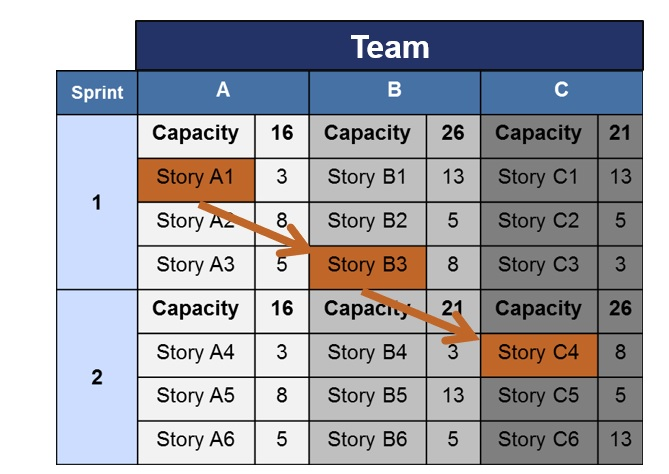
Figure 5 Release Plan
Figure 5 illustrates the basic format of a Release Plan. It shows the ranked (sequenced) set of Stories assigned to each Team for each Sprint, along with Story estimates and the estimated capacity for work (Velocity) for each Team per Sprint. Cross-Team dependencies are indicated by the arrows. (Dependencies will exist between Stories done a single Team as well, but are not shown in the diagram.)
9.1.4 Tracking and Metrics
The key metric for tracking progress for a Product Release in a Release cycle is the Burn-Up chart.
Figure 6 shows a typical Burn-Up chart. Burn-Up charts show progress towards a goal. The most common goal is the planned scope of a Release or Project, whose duration on the calendar spans multiple Sprints. The black scope line shows the effort that has been estimated for the planned scope, which varies due to scope changes and revisions to estimates. The bars show the amount of work associated with completed Stories. Ideally, the two curves will intersect at the end of the chart, indicating that the planned scope was completed on the planned end date. In practice, plans and estimates both evolve over time, so the chart is used to guide the scope-change decisions that will be required to meet the business objectives for the Release or Project.
A Burn-Up chart may show a single Team’s progress, or show the aggregated progress across all Teams working on a Product Release. Both views are useful.
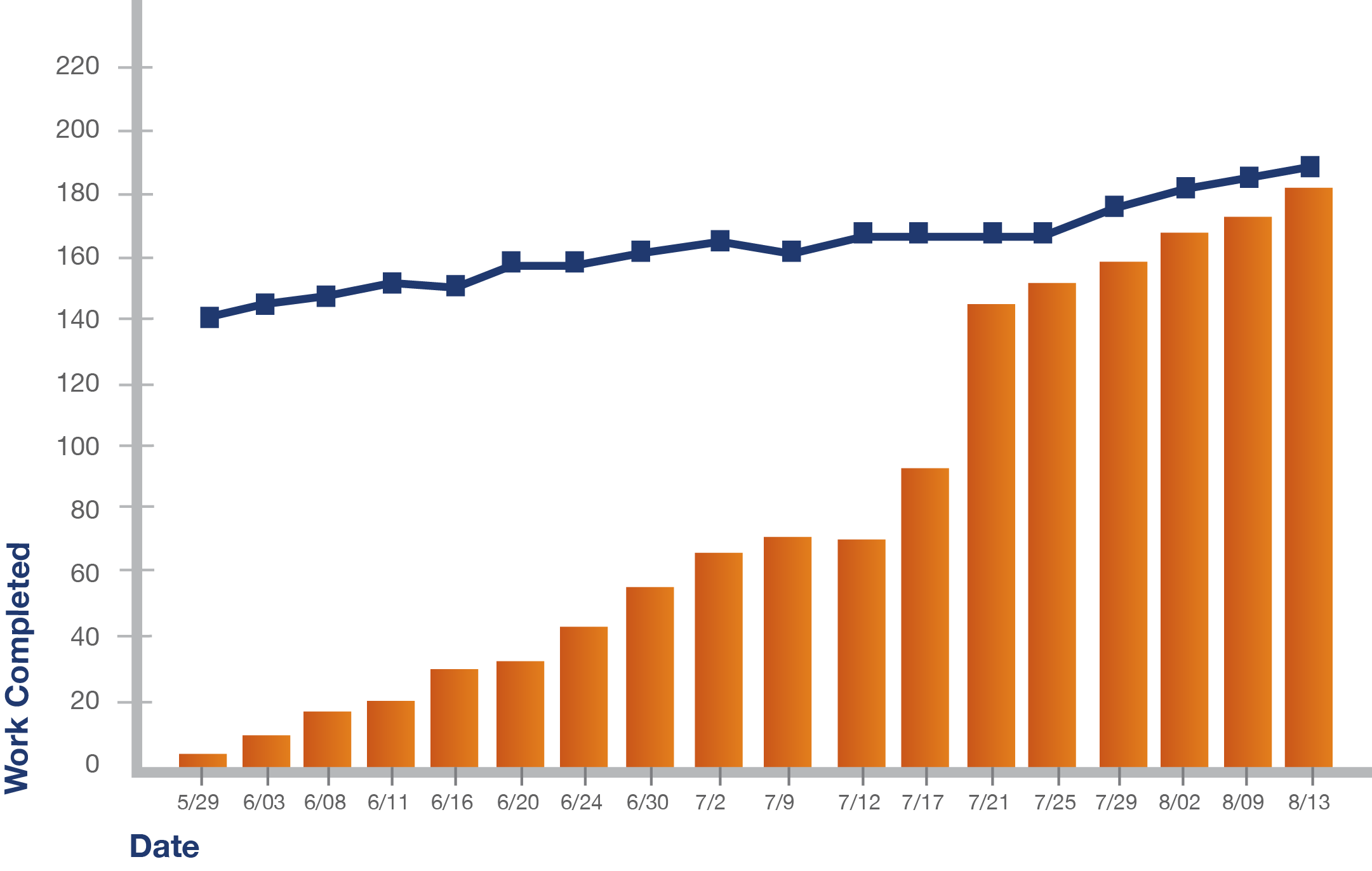
Figure 6 Typical Burn-Up Chart
Roughly speaking, we look for two things in a Burn-Up chart:
- Is work proceeding at a reasonably steady and predictable rate? If not, we need to investigate to understand the reasons, and identify appropriate corrective actions.
- Is the scope achievable? Meaning, does the trend of work progress intersect the scope line at the end of the Release cycle? If not, and if work is proceeding as well as can be expected, then the scope needs to be adjusted downwards. (Similarly, if the chart indicates that the planned scope will be completed early, more scope may be added to the Release cycle.)
9.1.5 Governance Points
Governance is exercised in a variety of ways, by different people at different points. Table 2 summarizes the Program-Level governance points appropriate for the process described above.
| WHEN | PARTICIPANTS | DECISIONS AND ACTIONS |
| Release Planning Meeting | Program Manager, Area Product Owner, all Product Team members | All Roles and Project Teams work together to estimate work, identify and fill holes in specifications, schedule deliverables, and identify and schedule cross-Team dependencies. |
| Scrum-of-Scrums Meeting | Program Manager, Project Team representatives | Each Project Team representative (ScrumMaster or Team Member) describes what his/her Team is doing that affects other Teams, and issues Team is experiencing due to work of other Teams. Follow-up actions and owners are identified to resolve issues. |
| Release Review Meeting | Area Product Owner, Team Product Owners | Team Product Owners provide information required for Area Product Owner to understand whether Product Release has met content and quality goals, and Release’s Definition of Done. Area Product Owner makes go/no-go decision for Production deployment of Release. |
| Continuous | Program Manager | Program Manager does whatever is needed to make cross-Team collaboration as productive as possible, Program Manager monitors metrics and tracking system, attends and facilitates ceremonies, and talks informally with ScrumMasters and Product Owners to ensure that what needs to be done, is done. Program Manager provides information about status and risks to management, as needed. |
| Area Product Owner | Area Product Owner develops specifications for major deliverables, estimates ROI, and develops Business Cases for Portfolio decisions. Area Product Owner collaborates with customers and stakeholders to understand needs, and with Team Product Owners to enable them to develop detailed specifications for Project Teams to implement. Area Product Owner makes scope-change decisions for Release, and collaborates with Team Product Owners and Project Teams to ensure revised Release scope is achievable. | |
| Project Teams | Teams collaborate on cross-Team work, as needed. |
Table 2 Program-Level Governance Points for Agile Processes
9.2 Governance for Deployment: Across the Business Units
The TelCorp WebPortal Organication (WPO) owns the Web portal, and the associated governance required to ensure that deployed applications work together successfully at the time of deployment. The quarterly Release cycle provides four opportunities per year for Business Units to update their applications. WPO does not own the application-development process in the “upstream” BU’s, but does set and enforce standards relating to deployment.
The governance activities in this area may be categorized as
- Ensuring that the information and infrastructure changes needed to support deployment have been transferred to and addressed by WPO
- Ensuring that applications and the Production environment are ready for the former to enter the release process
- Ensuring applications are ready to exit the release process (i.e., may be deployed)
- Ensuring that the deployment has been done correctly
WPO has an additional complication in that some of the upstream Business Units develop applications with a Scrum process, while others use a Waterfall process. The latter defers the bulk of testing, including integration testing, until after development of all functionality is complete. This results in long test cycles, focused on integration and regression testing, during which hundreds of bugs are typically found and must be fixed.
The Scrum and Waterfall processes are very different, but the applications produced by both all flow into the WPO Release process, and WPO must accommodate the needs and characteristics of both.
9.2.1 The Waterfall Process Flow
The Waterfall process envisions the work of software development as a project of fixed scope which goes through a set of phases, with control points called “phase gates” at which exit or entrance criteria must be satisfied in order for the work to proceed to the next phase.
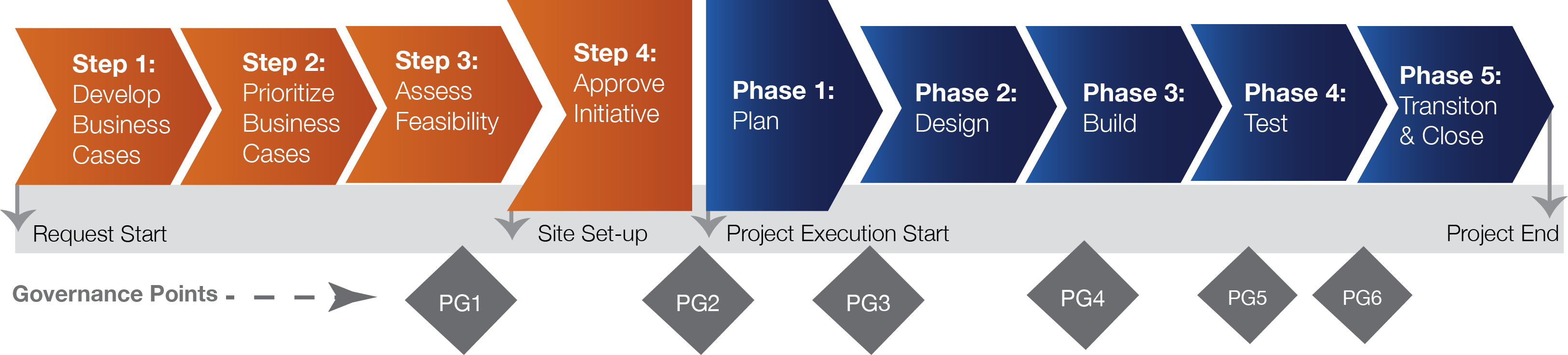
Figure 7 A typical Waterfall Process for a TelCorp BU
The example of Figure 7 shows lifecycles for requirements development and project implementation. Product Managers and Business Analysts develop a portfolio of requirements, and ultimately select the scope of a project whose completed software application will be released to Production. Afterwards, the Project Lifecycle kicks off, and the Project Team develops and tests the application until it is ready for Production deployment.
The full lifecycle contains several Phase Gates, at which different groups of stakeholders (PMO members, Release Management Teams, etc.) review the state of the work and either approve it for the next phase, or declare the project not ready for the next phase.
The details of the entry and exit criteria and governance points vary somewhat from one BU to the next, and are not important forour focus, which is on Agile governance. The key points to be understood about the Waterfall process is that it assumes the definition and implementation of a large, monolithic scope, for which work proceeds through phases and terminates in testing and deployment, and throughout which some concept of governance is exercised at specific points.
9.2.2 The Scrum Process Flow
In the Scrum process, requirements-development is not a phase, but an ongoing thread of activity that is concurrent with development and testing. Each Team plans and executes the next Sprint, during which the Team implements, tests, and debugs (ideally) one “Story” (specification) at a time, in a predefined sequence (“rank order”). After one quarter’s worth of Sprints, the accumulated deliverables are released into a Production environment, and work on the next quarter’s content begins.
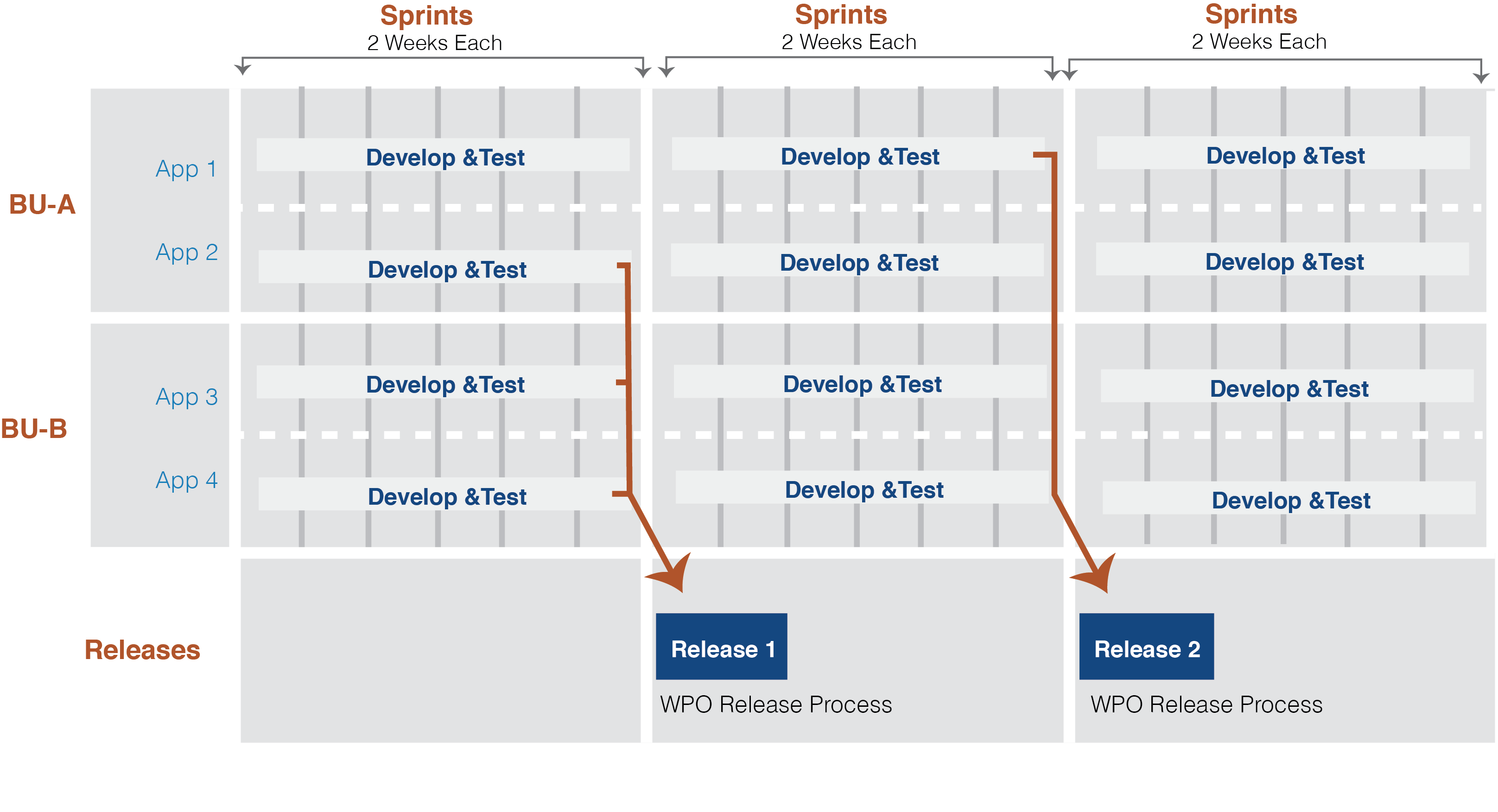
Figure 8 Scrum Process Flow for Releases Involving Multiple Business Units
Figure 8 shows three applications (Apps 2 through 4), produced by two Business Units, being deployed as a set in the first Release of the year. These three applications depend on each other, and updates must be deployed for all three at the same time.
Meanwhile, work continues on another application (App 1), which is not ready for deployment until a later date.
9.2.3 Integrated Release-Management Process
Many of the TelCorp Business Units chose the Scrum process in order to enable rapid response to changing business environments and customer needs. The Scrum process does allow for quick changes in direction, but this benefit cannot be fully realized if the release to Production Deployment is a lengthy process. In the classic Waterfall world, integration, regression, and most functional testing occurs after “code freeze” for the entire scope implementation, and may require months of work. WPO supports this style of work in its Release Management process, because many of the BU’s do use a Waterfall process, but also provides a “fast track” Release Management process for BU’s that use a Scrum process and produce production-ready applications.
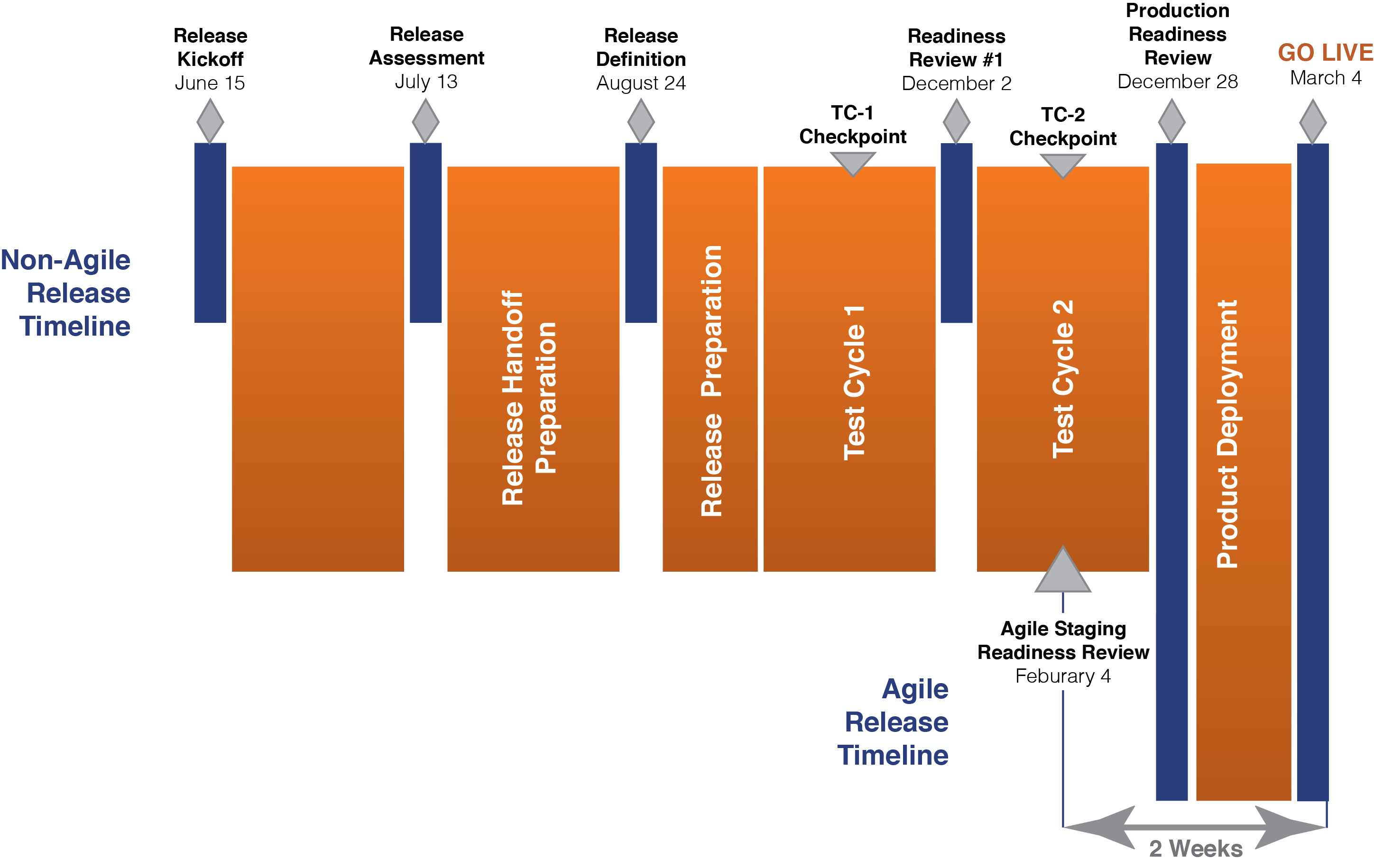
Figure 9 Hybrid Release Management for Scrum and Waterfall Projects
Figure 9 shows the hybrid Release process. Applications developed with a Scrum process have already completed functional, integration, and regression testing prior to entering the Release process. These applications typically pass through a brief Staging Readiness Review, followed by deployment into the Staging environment for final validation of the entire application ecosystem. This period is only two weeks long, and is followed by Production Deployment.
Applications developed with a Waterfall process go through a much longer release process, which includes functional, integration, and regression testing. The testing period typically requires four months, during which bugs that are found are also fixed. After this validation work has been completed, the applications move to the Staging Readiness Review, and are deployed to the Staging environment. From this point on, all applications go through the remaining steps in the same fashion, independent of whether they were produced by a Waterfall or Scrum process.
Activities relating to Production Deployment on the WPO side are the responsibility of the Release Management Team, whose members fulfill the Release Manager and Production Manager roles (Section 9.2.5). The Release Management Team provides the interface between the Business Units and the WPO Production Operations Team that does the hands-on work of deploying applications to the Staging and Production environments.
9.2.4 How Handoffs are Accomplished
Handoffs of deliverables from one group to another are common, with a common example being that of handing off an application from a BU to WPO for deployment. Like many companies, TelCorp has often made the incorrect assumption that handoffs are straightforward, and then discovered that they are not.
A handoff always involves a transfer of information from one group (the source) to another (the receiver). A common mistake is to assume that this transfer of information is simple and one-directional, but this is often not the case, and it is almost never the case for handoffs of applications to a deployment organization in a large enterprise.
In general, handoffs can be executed in three ways, depending on the level of complexity and uncertainty involved: Documentation, Discussion, and Collaboration.
9.2.4.1 Documentation
If all that a handoff requires is the unidirectional transfer of standardized and well-understood information, then it can be accomplished by creating a document that contains the necessary information, and supplying the document to the receiver. Often this amounts to no more than filling out a standard form.
Handoff via documentation only works if the complexity and uncertainty inherent in the situation is low enough that it is practical to capture all of the required information in one document, either in a first attempt, or at most over a couple of minor revisions. This scenario also requires that the source and receiver both understand what is needed well enough to communicate the details via documentation.
9.2.4.2 Discussion
When the issues are more complex, or the source of information does not understand the needs well enough, it is better to hold a meeting to discuss the handoff than to simply supply a document. The discussion between source and receiver provides the additional clarity required to close the gaps in understanding, and often leads to the creation of a useful handoff document.
9.2.4.3 Collaboration
When uncertainty is still greater, and issues require follow-up investigation or work by the source or receiver, collaboration is a better path to making the handoff successful. This kind of collaboration consists of a number of meetings, or joint working sessions, and follow-up actions between meetings required to ensure successful handoff. With this approach, handoffs become a process, rather than an event.
9.2.5 Roles
We will define the Roles of Production Manager, Production Manager, and Production Operations Team, by specifying their responsibilities and areas of authority.
Release Manager: The person responsible for the complete production deployment process. Oversees and coordinates the work of Production Managers. Responsibilities include
- Work with Production Managers to ensure that all handoffs are being managed effectively
- Facilitating internal Production Stand-Up meetings
- Provide guidance to Release Managers and Production Operations Team members regarding cross-application issues
- Generate purchase requests for upgrades to the Staging and Production environments required to support deployment and operations
Production Manager: The responsible person, on the WPO side, for the handoff of applications from a particular set of Business Units to WPO for production deployment. Responsibilities include
- Facilitating the handoff of applications from a specific set of BU’s.
- Identifying and conveying to the WPO Operations Team the information required to enable deployment of the BU’s applications
- Ensuring that follow-up actions are identified and assigned to the appropriate parties within WPO (primarily the Production Operations Team)
- Following up to ensure that necessary actions have been performed as needed
- Working with the BU’s Program Managers to ensure that the applications will satisfy the Staging Entrance Criteria by the time of the Staging Readiness Review meeting.
Production Operations Team: The team responsible for deploying applications to the Staging and Production environments. Responsibilities include
- Configuring, upgrading, and deploying applications to the Staging and Production environments
- Maintaining and modify the Staging and Production environments to meet BU application needs, and ensure acceptable quality of service to users of the Production system
9.2.6 Ceremonies
For WPO, “governance” is about ensuring that applications that enter the Release process will flow into a successful Production Deployment. Since WPO does not control the internals of the upstream BU’s development, all it can do is set entrance criteria for incoming applications, and then apply its own governance practices throughout the Release process.
9.2.6.1 Release Handoff Process
The release of an application for production deployment involves a handoff from the application development teams to the WPO Deployment Operations team. The purpose of this process is to ensure that the handoff is successful, by ensuring that the entrance criteria for the Staging Readiness Review meeting (below) will be met. The process is carried out through a sequence of up to four Release Handoff meetings, each of which often generates a list of action items on both sides (the BU and WPO).
The logistics of these meetings can be challenging, as each Production Manager will have up to four of these meetings with different sets of people. The logistical issues are simplified somewhat by having at each of these meetings the Area Product Owners and Program Managers associated with a linked set of applications, whose deployment must be done as a set (meaning all or none).
- BU action items primarily consist of collecting and supplying information required by WPO, primarily around deployment-related needs and application readiness.
- WPO action items are a mix of research tasks and configuration changes to the Staging and Production environments, including installation of servers and other kinds of hardware and software that will be required by the applications to be deployed.
9.2.6.2 Staging Readiness Review Meeting
The Staging Readiness Review Meeting is the entry point into the Release process for applications developed with ads Scrum process. The purpose of this ceremony is to confirm that the Staging Entrance Criteria have been met before the start of the Release process.
The Release Manager meets with the Production Managers responsible for the readiness of the applications, and relevant members of the Production Operations Team. They discuss the readiness of the applications and environments, and either confirm that the criteria have been met, or the Release Manager rejects applications for Production Deployment. Rejection is a rare event, and can be very expensive, as rejection of one application may result in many other dependent applications also be rejected for the Production Deployment.
The following Entrance Criteria are confirmed for each application:
- Dependencies between applications that must be released as a set have been communicated to the Production Operations Team.
- The deployment process for the applications is automated, with the standard deployment-automation tools, and the Business Units have confirmed that deployment works in QA environments.
- All changes to the Staging and Production environments that are required to support the applications are understood, and the Production Operations Team believes these changes can be completed on time for the Staging and Production Deployments.
- There are no known P1 bugs in the applications.
- P2 and higher bugs have been judged acceptable by the Team and Area Product Owners.
- Full integration and regression testing have been done, using all of the “live” applications that interact.
- The “happy path” and end-to-end tests to be performed in Staging are automated and have been demonstrated to work.
- The business value of this Release is clear, and justifies the Release.
The testing performed in Staging is necessarily brief. The purpose is not to validate basic application functionality (which must already have been done), but to validate that deployment yields a functioning Web site. The issues encountered at this point are primarily in the area of configuration, and testing provides a final opportunity to identify and correct these issues.
9.2.6.3 Production Readiness Review Meeting
The Production Readiness Review Meeting occurs after the completion of application deployment and testing in the Staging environment. Its purpose is to confirm that the Production Entrance Criteria have been met before the start of the Production Deployment process.
The following Entrance Criteria are confirmed for each application:
- All linked applications that must be released as a set have passed end-to-end testing in the Staging environment, and demonstrated acceptable levels of quality and performance.
- The process of deploying the application to Staging revealed no show-stopper issues.
- All changes to the Production environment that are required to support this and related applications have been completed and confirmed to work as intended.
The Release Manager meets the Production Managers and relevant members of the Production Operations Team to confirm that all applications are ready for Production Deployment. Rejection is a rare event, and can be very costly, as rejection of one application may result in many other dependent applications also being rejected for this Production Deployment.
9.2.6.4 Production Stand-Up Meeting
This semi-weekly meeting of the Production Managers is facilitated by the Release Manager. It focuses on cross-application deployment issues. Each of the Production Managers describes to the attendees
- What deployment issues I have identified that may impact other applications
- What deployment issues are currently impediments to the deployment of applications for which I am responsible
The response to each issue is to identify who must meet afterwards to resolve the issue.
9.2.6.5 Production Deployment Validation
The actual deployment of applications to Production is not a governance moment as such, but it is followed by a quick “happy path” test to confirm that all applications are running and communicating with each other and all components of the Production environment. Officially, the Release Manager gives a go/no-go decision based on the test results. In practice, all of the people involved in the Production Deployment work to resolve any last-minute issues, and actual no-go decisions are extremely rare. They are rare because issues can usually be resolved, and because a no-go requires a very expensive rollback, disrupts enterprise-wide plans, and disappoints the users.
9.2.6.6 Summary of Ceremonies
| CEREMONY | TIME BOX | INPUT | OUTPUT | VALUE |
| Release Handoff Meetings | <2 hr | Current draft of Handoff plan |
Revisions to Handoff plan Action Items |
Prepares for Handoff Prepares for Staging Readiness Review |
| Staging Readiness Review | 30 min | Handoff plan | Decision to deploy application to Staging environment, or defer to next Release opportunity | Ensures application readiness for Staging deployment |
| Production Readiness Review | <15 min |
Handoff plan Conclusions from Staging deployment |
Decision to deploy application to Production environment, or defer to next Release opportunity | Ensures application readiness for Production deployment |
| Production Stand-Up Meeting | < 1 hr | Status and issues per Release Manager | Arrangements to resolve issues | Improves situational awareness, and ensures issues are addressed quickly |
| Production Deployment Validation | 8 hr | Quick test of the applications deployed in Production | Decision to go live or roll back | Ensure site is working |
9.2.7 Tracking and Metrics
The Release Management Team uses a simple Kanban tracking system to show how upstream applications from the Business Units move through the production deployment process. The work items are the BU applications, and the workflow states for this process are
- Backlog: Applications expected to enter the process, but which have not done so yet
- Handoff: Applications for which Release-Handoff work is currently being done
- Waiting for Staging Readiness Review: The Release-Handoff work is complete
- Waiting for Staging: The application has passed the Staging Readiness Review, and is ready for deployment in the Staging environment
- In Staging: Staging deployment and testing have begun, but not finished
- Waiting for Production Readiness Review: The application was deployed in the Staging environment, and passed all relevant tests
- In Production: The application has passed the Production Readiness Review, and is ready for deployment in the Production environment.
- Done: The application has satisfied the exit criteria (Definition of Done) for Production deployment, and no more production work needs to be done for it
The Kanban tracking system is set up with sticky notes on a large whiteboard, with one column per workflow state. Although very simple, this approach has worked well enough that there is little desire in WPO to replace the system with a Web-based product.
The Release Manager records daily workflow information in a spreadsheet, and uses the spreadsheet program to generate a Cumulative Flow Diagram to provide insights into trends and bottlenecks over time. This information has helped to quantify constraints due to resources, and provided justification for expanding the pool of Production Managers as the company has grown.
9.2.8 Governance Points
Governance is exercised in a variety of ways, by different people at different points. Table 3 shows typical governance points for the Release process at the Program level.
|
WHEN |
PARTICIPANTS | DECISIONS AND ACTIONS |
| Release Handoff Meetings (weekly) | Production Manager, BU Program Manager(s), other personnel as needed | Attendees identify whether Staging entrance criteria are satisfied, and what information is required for the Release Plan (including deployment instructions, changes to Staging and Production environments, configuration information, etc.). Follow-up work is done between meetings, as needed. The sequence of Release Handoff meetings ends when participants agree that the application can enter the Production Deployment process. |
| Staging Readiness Review Meetings (Daily, or as needed) | Release Manager, Production Managers | All review each application's satisfaction of Staging entrance criteria, to determine readiness to enter the Production deployment process. The Release Manager makes the go/no-go decision at this time. |
| Production Readiness Review Meeting (Daily, or as needed) | Release Manager, Production Managers, Production Operations Team | All review status, determine readiness of applications for Production deployment. |
| Production Stand-Up Meeting (semi-weekly) | Release Manager, Production Managers | Release Manager facilitates. Production Managers update group on status and issues relating to application deployments, and identify who will follow up to resolve issues. |
| Production Deployment Validation | Production Operations Team | Team members confirm whether deployed applications are working as required. |
Table 3 Program-Level Governance Points for the Production Deployment Process
10 GOVERNANCE AT THE PROJECT LEVEL
Project Management applies knowledge, skills, tools, and techniques to organize the work of a group of people to achieve project objectives. In the Agile context, we will consider the Team (as in Scrum Team) as defining the Project level. The Project level is always internal to a Business Unit or other organization within the company, as Teams belong to these units, and cross-Team collaboration is defined to be Program-level work.
Project-level governance supports successful delivery of desired results, and therefore incorporates monitoring of the status of the work. Status information derived from monitoring is used at the local level by Teams to help them deliver, and by Program- and Portfolio-level managers and stakeholders for use in making decisions at those levels.
The following sections provide a summary description of basic development processes, and then look at Project-level governance as performed by our three organizations of interest.
10.1 Process Definitions
The processes of interest are Scrum and Kanban.
10.1.1 The Scrum Process
The Scrum process is appropriate for environments where there is need to plan the delivery of results on a schedule, but where scope and effort are not well understood, and where it is possible to start and complete a set of tested deliverables within one to a few weeks. It is well-suited for software development, Data Warehouse and Business Intelligence development, and other environments with similar characteristics.
In this process, Scrum Teams work in Sprints (iterations) typically of 2—4 weeks in length. In each Sprint, the Team starts and completes a set of deliverables. The specifications for each deliverable are provided at a summary level in a standardized format called a Story. The Team works through a set of Stories whose content and ranking (sequencing) is driven by the Product Owner, and whose total scope is constrained by the Team’s available capacity for work in the Sprint (the Team Velocity).
Governance is built into Scrum through the definition of Roles, Ceremonies (standard meetings), and the Definition of Done.
10.1.1.1 Roles
The Roles of Product Owner, ScrumMaster, and Team members are clearly defined, as are the responsibilities and areas of authority associated with each:
Product Owner: The sole authority over product requirements (definition and sequencing), for up to three Teams. Responsibilities include
- Developing requirements, in collaboration with customers, stakeholders, and Team members
- Providing near real-time guidance to Team during implementation and testing of deliverables
- Reviewing and approving deliverables
ScrumMaster: The sole authority over process, for up to three Teams. A ScrumMaster does whatever is needed to make the Team as productive as possible. ScrumMaster responsibilities include
- Enforcing the process
- Facilitating meetings
- Maintaining situational awareness of the work
- Knowing Team member strengths and weaknesses
- Mentoring the Team
- Protecting the Team from interference
- Monitoring progress
- Removing obstacles, ensuring issues are addressed
Team: The sole authority over Estimates, Task definitions, and Task assignments. A Team contains up to nine members who do the hands-on work of implementing and validating deliverables. Team responsibilities include
- Implementing and validating (testing, fixing) deliverables
- Completing work to standard “Definition of Done”
- Estimating work for deliverables
- Allocating tasks within Team (self-organizing) based on skills and availability
10.1.1.2 Ceremonies
Ceremonies are recurring meetings with specific and standardized agendas and practices. Each ceremony has a particular purpose, as summarized in Table 4.
|
CEREMONY |
TIME BOX | INPUT | OUTPUT | VALUE |
| Backlog Refinement | <1 hr | Draft User Stories, Epics from Product Owner |
Finalized User Stories Technical Stories Ranking for top PBIs |
Product Backlog & Team are ready for Sprint Planning |
| Sprint Planning | 2—8 hr | Ranked Product Backlog with Acceptance Criteria |
Sprint Backlog:
|
Team has a plan to implement Sprint Backlog |
| Daily Scrum (Stand-up) | <15 min | In-progress Tasks |
Tasks updated Impediments raised |
Team members on same page re: Sprint progress and impediments |
| Sprint Review | < 1 hr | Demo prepared for completed stories |
New Stories, based on review by Product Owner Ranking may be revised |
Deliverables reviewed; feedback from stake-holders, other teams |
| Retro-spective | 1—1.5 hr | Sprint performance data, e.g. Burndown chart | Short list of improvements for next Sprint, with owners | Learn from experience, enable continuous improvement |
Table 4 Scrum Ceremonies
Figure 10 shows a typical schedule for a two-week Sprint. Note that the meetings take up eleven of the eighty hours of working time in the Sprint.
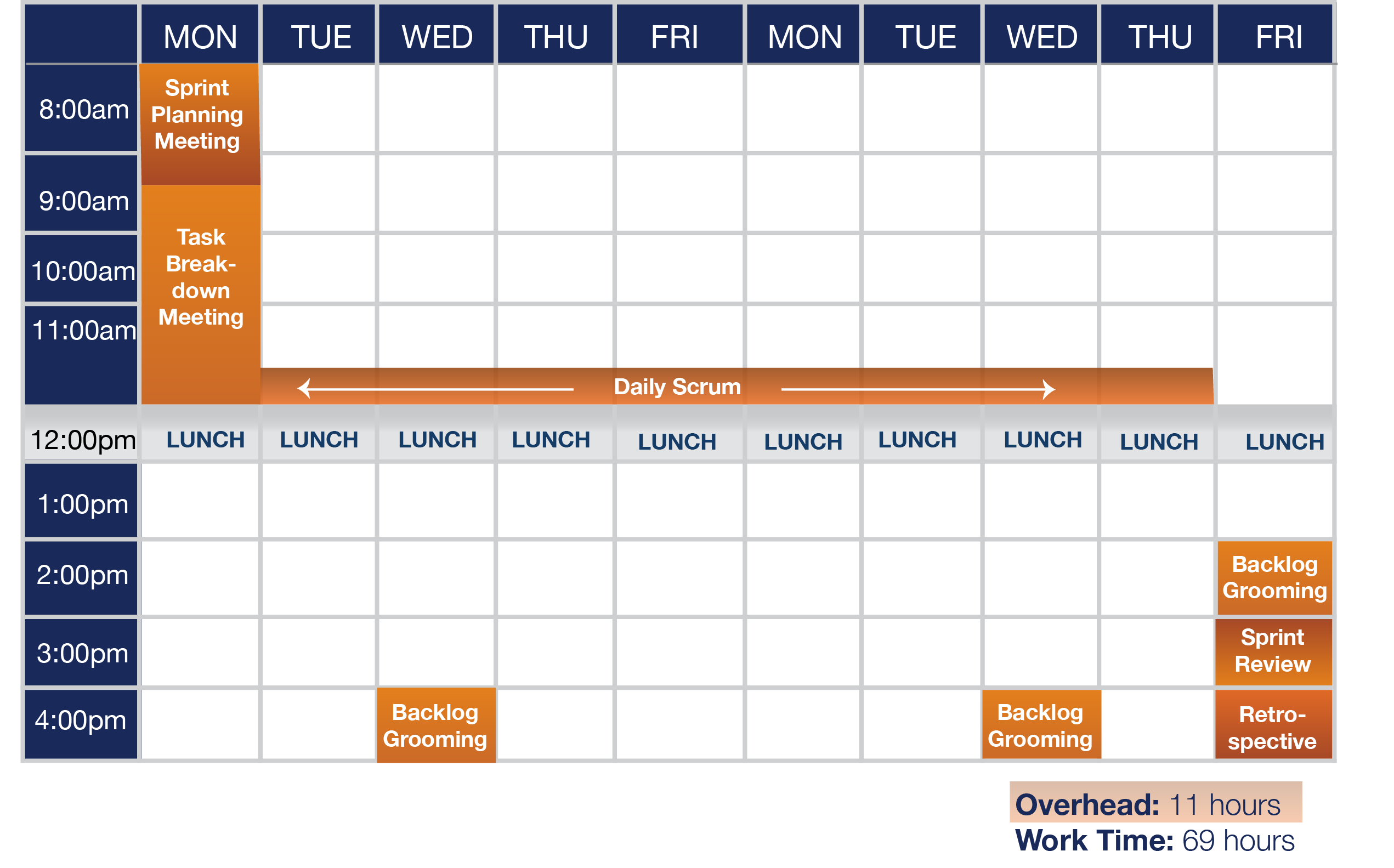
Figure 10 Typical Sprint Schedule
The practice of Backlog Refinement drives effective decisions about the definition, sequencing, and scheduling of deliverables to be implemented by a Scrum Team. Sprint Planning produces the Sprint plan, or Sprint Backlog (selection of deliverables to be developed, and associated Tasks and estimates), which defines the scope of the Sprint for the Team. The Sprint Review meeting gives the Product Owner a final opportunity to approve deliverables (or to specify what changes will be required), while the Retrospective meeting drives rapid improvement in the Team’s ability to deliver.
The day-to-day and hour-to-hour collaboration of Team members follows the Swarming strategy, which minimizes the risk of Story non-completion, and maximizes the value that can be delivered in a Sprint in the face of substantial uncertainty. Teams “swarm” on Stories to complete them in as close to rank order as is possible.
Swarming means that the Team self-organizes by allocating Team members to work on each Story in a way that minimizes the duration of its implementation. At the beginning of the Sprint, the Team allocates as many people as possible to work on each of the top few Stories, by deciding how many people can work on a Story to get it done as fast as possible, and who, specifically, should work on it. Each “swarm” works on one Story, driving it to completion as quickly as possible.
The Swarming strategy requires that a Team member remain with a swarm as long as there is a task that he/she can perform, even if it doesn’t match the member’s particular specialty. Only if there is literally no work that the member can do does the member move on to another Story, in which case he/she moves to the nearest Story in the ranking after this one, where the member’s presence will get the Story done sooner than would otherwise be the case.
10.1.1.3 Artifacts
The following artifacts are widely used in this process.
10.1.1.3.1 Definition of Done
The Definition of Done clarifies and standardizes the Team’s understanding of what must be accomplished in the course of creating, testing, and fixing defects in each deliverable. It contains a set of policy statements regarding how quality is assured, and how organizational standards are met. Figure 11 show a typical set of such policies.
Figure 11 A typical Definition of Done for a Team's Stories
Each Team should have a Definition of Done that is relevant for the kind of work that Team does. (For example, Teams doing Data Warehouse and Web Application development would have different Definitions of Done.) However, there will usually be common elements across Teams, and some effort should be devoted to providing as much commonality across definitions as makes sense.
10.1.1.3.2 Stories and Epics
The most common, standardized artifact is the Story. A Story is a specification for a deliverable that one Team can implement in a few days. Larger specifications, called Epics, must be decomposed into Stories prior to implementation. Epics of modest size may be decomposed directly into a few Stories, while the decomposition of larger Epics may yield a tree structure whose interior nodes are child Epics, and whose leaf nodes are Stories.
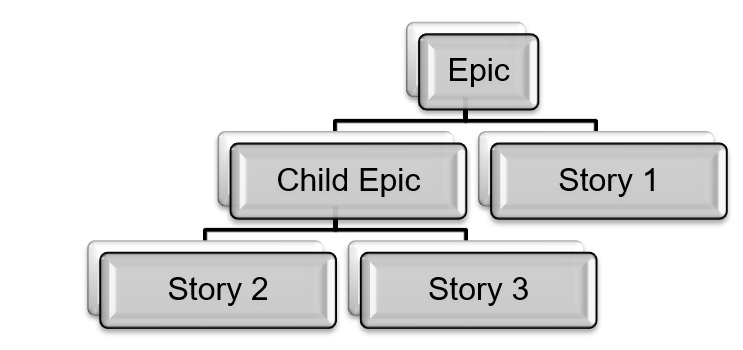
Figure 12 Decomposition of an Epic into Stories
10.1.1.3.3 Product Backlog
The next artifact is the Product Backlog, which refers to the set of requirements developed for a specific Team, which have not yet been assigned to a particular Sprint for implementation. The Product Backlog contains Stories and Defects (bug reports). The Product Backlog is often thought of as having two parts, the top (which is ranked, or sequenced, for planning purposes) and the bottom (which has not been ranked).
TelCorp has defined two types of Stories: User Stories, which describe user-facing behavior to be implemented, and Technical Stories, which describe all other planned deliverables (e.g., infrastructure, focused research efforts, proof-of-concept development, refactoring, non-product chores).
10.1.1.3.4 Sprint Backlog
The Sprint Backlog is the ranked sequence of Product Backlog Items (Stories and Defects) assigned to a particular Sprint for implementation. During Sprint Planning, items are moved from the Product Backlog into the Sprint Backlog. After a Sprint has been completed, the Sprint Backlog for that Sprint is the set of all Product Backlog Items that were completed, which may not be the same as what was planned.
10.1.1.4 Tracking and Metrics
The key tracking tools for a Scrum Sprint are the Taskboard and Burndown chart.
Figure 13 shows a typical Taskboard and Burndown chart, and shows the current status in the middle of a Sprint. The Taskboard shows the Tasks associated with different Stories, and the state of each Task. The Burndown chart shows the amount of work remaining across all Tasks planned for the Sprint but not yet completed, along with a diagonal line that shows the planned values. These two tools enable a clear understanding of how well the work of the Sprint is going.
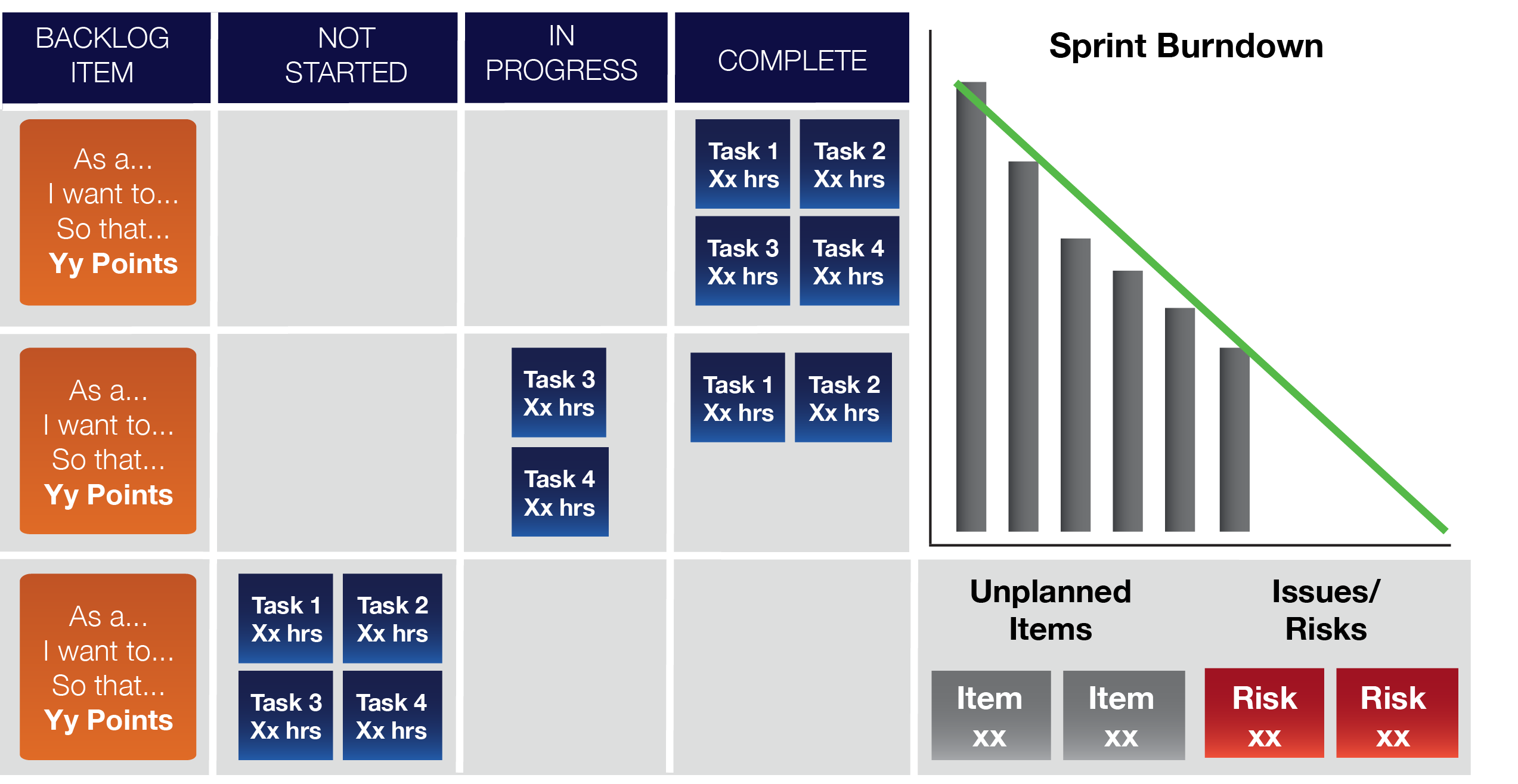
Figure 13 Scrum Taskboard with Burndown Chart
10.1.1.5 Governance Points
Governance is exercised in a variety of ways, by different people at different points.
Table 5 shows typical governance points for a Scrum process at the Project level.
|
WHEN |
PARTICIPANTS | DECISIONS AND ACTIONS |
| Backlog Refinement Meeting | Team, Product Owner | Team provides guidance on quality and completeness of requirements, technical "holes," other work that is required but not user-facing, and dependencies. Product Owner revises requirements based on this input. |
| Product Owner decides how work will be ranked (sequenced), based on value and dependencies. | ||
| Sprint Planning Meeting | ScrumMaster, Product Owner, Team | All Roles work together to estimate Stories and define the scope of the Sprint. |
| Daily Scrum Meeting | ScrumMaster, Product Owner, Team | All Roles collaborate to decide who will follow up to address issues raised in this meeting. |
| Sprint Review Meeting | ScrumMaster, Product Owner, Team | Product Owner decides whether completed deliverables are acceptable for ultimate release to customers, or whether deliverables will require further work. |
| Retro-spective Meeting | ScrumMaster, Product Owner, Team | All Roles decide how to improve their process and environment, through policy decisions and follow-up actions. |
| Per Story | Team | Team collaborates with Product Owner as needed to complete the work successfully. Team ensures that all work required to meet the Definition of Done is completed. |
| Product Owner | Product Owner collaborates with Team during their work on deliverables, to ensure deliverables are as desired. | |
| Continuous | ScrumMaster | ScrumMaster does whatever is needed to make the Team as productive as possible. ScrumMaster monitors metrics and tracking system, attends and facilitates Scrum ceremonies, and talks informally with Team members and Product Owner to ensure that what needs to be done, is done. |
| Product Owner | Product Owner develops and revises Stories and Epics, and their ranking, based in part on insights from Backlog Refinement and unstructured collaboration with Team members. | |
| Team | Team members write Stories for non-user-facing work, such as infrastructure, research, refactoring, etc., based in part on insights from Backlog Refinement and unstructured collaboration with Product Owner. |
Table 5 Project-Level Governance Points for a Scrum Process
10.1.2 The Kanban Process
The Kanban process is appropriate for environments where forecasting the delivery of results on a schedule is either impossible or not needed. The focus is primarily on prioritizing requests to do various kinds of work, which arrive at unpredictable moments, and organizing the workflow to optimize throughput. It is well-suited for Production Support, IT Operations, and other environments with similar characteristics.
In a Kanban process, requests for work to be done enter a pool of pending work items. While this pool has no standard name, we may as well borrow the Scrum term and call it the Backlog. The Kanban Team members work on these items to complete them in a way that maximizes throughput, and which involves moving the items through standard workflow states.
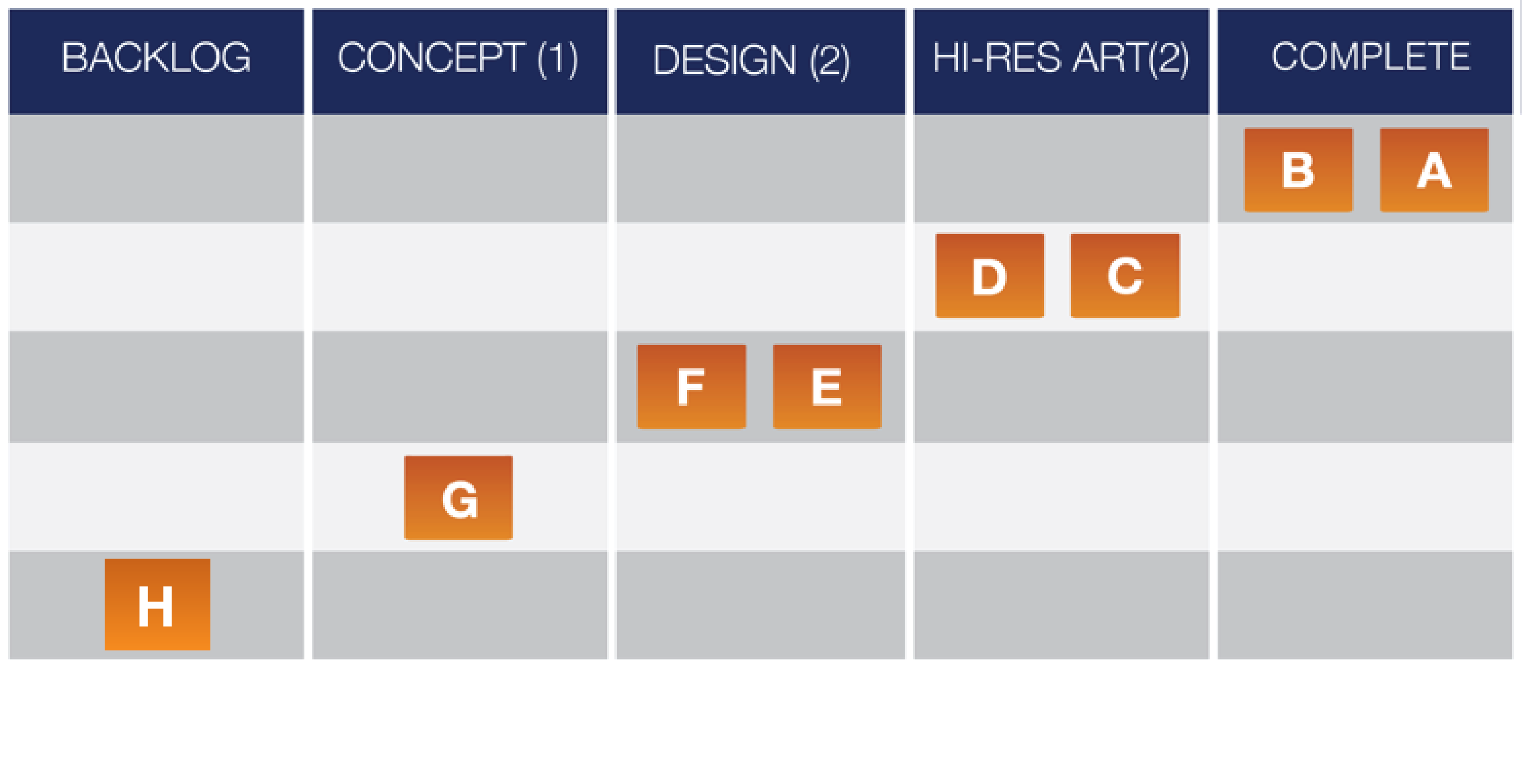
Figure 14 Example of Kanban Workflow States with WIP Limits
The number of items allowed in a workflow state is set by the Work-in-Process Limit, or WIP Limit, for the state, as shown in Figure 14. An item cannot move from one workflow state to the next until space becomes available for it. Thus Kanban is a pull-oriented process, because items are pulled into subsequent states when capacity exists, instead of pushed into them when the work of the preceding state is completed. When all workflow states are full, the movement of an item into the Complete state triggers a sequence of pulls that ripples back to the first state, at which point the top item in the Backlog may enter the workflow sequence.
A particular instance of a Kanban process has only one set of workflow states, and these vary from one instance to another. The example shown in the Kanban board of Figure 14 shows workflow states appropriate for creating illustrations to be used in a game or document.
Work items may be of three kinds, whose nature influences the appearance of the Kanban board.
- Work items may be deliverables whose specifications are provided in some form, and which move through predefined workflow states. This is the case shown in Figure 14.
- Work items may be deliverables whose nature is sufficiently diverse that common workflow states do not describe very well how the work is to be done. It is often more convenient to treat these as having three generic states of Backlog, In Progress, and Complete, rather than assign more specific states that may not be applicable to many of the work items. It may also be convenient to create a Task Breakdown for such items (as is done for Scrum), and track the finer-grained work by checking of tasks as they are completed. With this approach, the item enters the In-Progress state when work begins on one of its tasks, and moves to the Complete state when all tasks have been completed.
- Work items that represent Tasks (i.e., actions), rather than deliverables, move through the standard states of Backlog, In Progress, and Complete.
Governance in Kanban is very light, as the process definition contains very little beyond the brief summary just provided. Organizations must add other elements required for Kanban to be of practical utility. In practice, many of these additional elements are borrowed from the Scrum world, and we will make that assumption here. Thus we will look at Kanban governance by considering Roles, Ceremonies, and the Definition of Done.
10.1.2.1 Roles
It is true that Kanban defines no Roles. It is also true that various people must be responsible for various decisions and types of work, including definition of the workflow states and WIP Limits. In the absence of standard Role definitions, we will propose a candidate set of Roles that may be useful in deciding how to allocate these responsibilities.
Backlog Owner: The sole authority over work-item specifications and prioritization. Depending on the environment, this person may or may not develop the specifications, but is always responsible for ensuring that they have the necessary quality and completeness to be executable. Responsibilities include
- Prioritizing (ranking, i.e. sequencing) work items
- Ensuring quality of specifications for work items
- Providing near real-time guidance to Team during execution of work items
- Reviewing and approving deliverables
Process Master: The sole authority over process. This Role is analogous to ScrumMaster, in that it focuses on defining and enforcing the process, and doing whatever is needed to make the Team as productive as possible. Responsibilities include
- Defining workflow states and WIP limits to optimize throughput
- Enforcing the process
- Facilitating meetings
- Maintaining situational awareness of the work
- Knowing Team member strengths and weaknesses
- Mentoring the Team
- Protecting the Team from interference
- Monitoring progress
- Removing obstacles, ensuring issues are addressed
Team: The people who execute the work items. They may have specialized skills that are aligned with workflow stages. Team responsibilities include
- Implementing and validating (testing, fixing) deliverables and executing tasks
- Completing work to standard “Definition of Done”
- Estimating work for deliverables, if needed
- Allocating tasks within workflow stages, based on skills and availability
10.1.2.2 Ceremonies
Ceremonies are recurring meetings with specific and standardized agendas and practices. Kanban has no standard ceremonies, but there are standard actions that must be performed. These actions include
- Receive or define work items
- Make priority decisions
- Move items between workflow stages
In the absence of standard Ceremonies, we will propose a candidate set that may be useful in deciding how to perform these actions.
| CEREMONY | TIME BOX | INPUT | OUTPUT | VALUE |
| Backlog Refinement | <1 hr | Draft Work Items at the top of the prioritized Backlog | Finalized Work Items and ranking | Backlog & Team are ready for subsequent execution of Work Items |
| Daily Stand-up | <15 min | In-progress Work Items |
Team updated Impediments raised |
Team members on same page re: progress and impediments |
| Retro-spective | 1—1.5 hr | Recent performance data, e.g. Cumulative Flow chart | Short list of improvements for near future, with owners | Learn from experience, enable continuous improvement |
The Backlog Refinement meeting is held as often as needed (most commonly once per day). The Backlog Owner reviews top Backlog Items with the Team, and works out the ranking of items to be started in the near future.
The Daily Stand-Up and Retrospective meetings are identical to the Daily Scrum and Sprint Retrospective meetings of the Scrum process. The Retrospective is held as often as needed, but at least once per month.
10.1.2.3 Artifacts
Kanban has no prescribed artifacts, but organizations whose Kanban processes move deliverables through workflow states often use the Story format (Section 0) as the specification of a deliverable.
10.1.2.4 Tracking and Metrics
The key tracking tools for Kanban are the Kanban board (or Taskboard) and Cumulative Flow chart.
Figure 14 shows a sample Kanban board, which shows the state of work items. Items in the Backlog are waiting to start, while items in the Complete state have been finished. The work items that are in process are distributed across one or more workflow states that have predefined characteristics, and for which people with appropriate skills are associated. The number of items in each workflow state is restricted by the WIP Limit for that state.
Figure 15 shows a Kanban board used to track work for deliverables whose work cannot be decomposed into a standard set of workflow states. For each of these deliverables, the Team creates a Task Breakdown (as for Scrum), and track the finer-grained work by checking of tasks as they are completed. , An item enters the In-Progress state when work begins on one of its tasks, and moves to the Complete state when all tasks have been completed. (This board has no WIP Limits set per Task.)
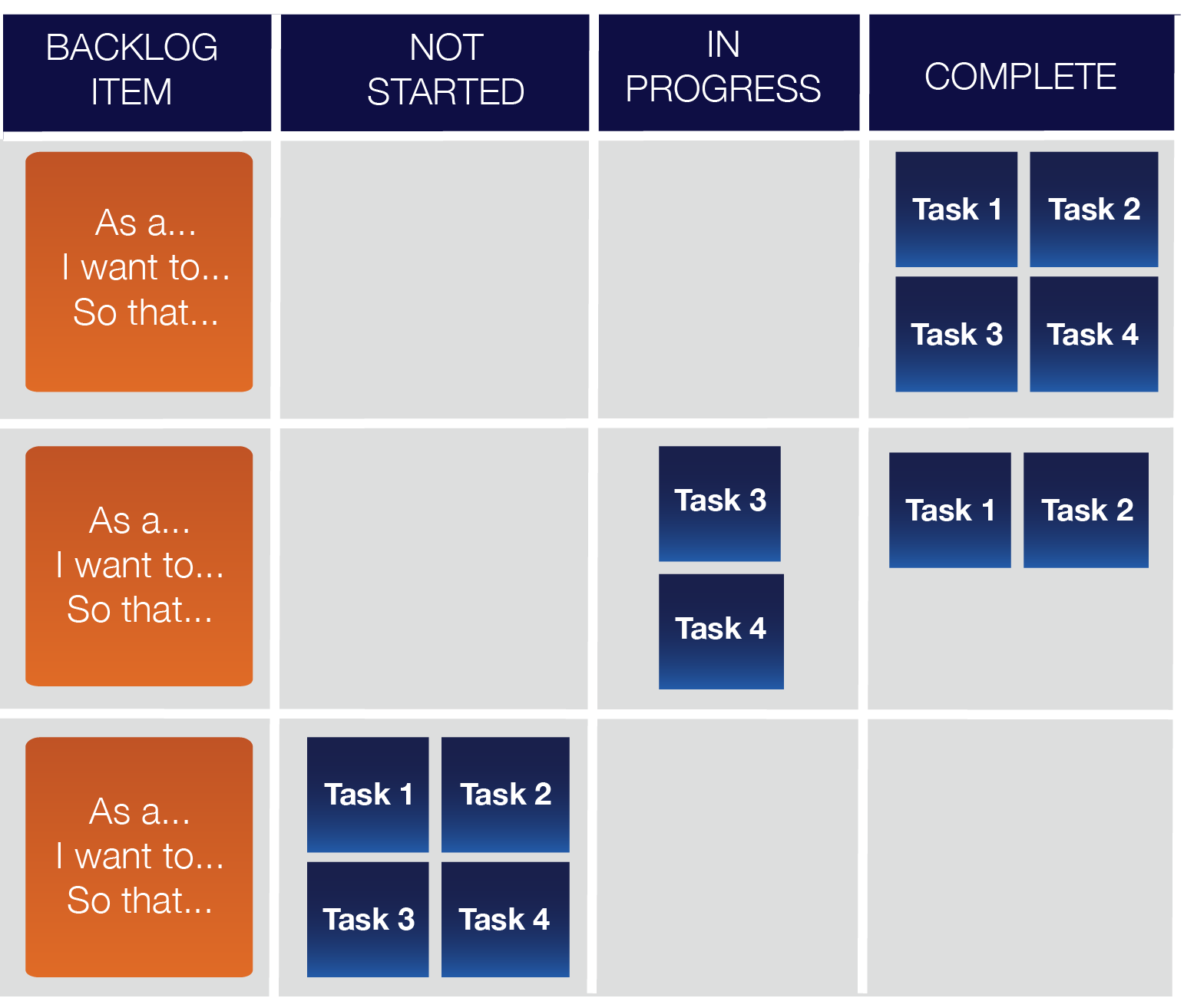
Figure 15 Kanban Board for Deliverables that have Task Breakdowns
Figure 16 shows a Kanban board for Tasks, which represent actions, as opposed to deliverables. The Kanban states for Tasks are Backlog, In Progress, and Complete. 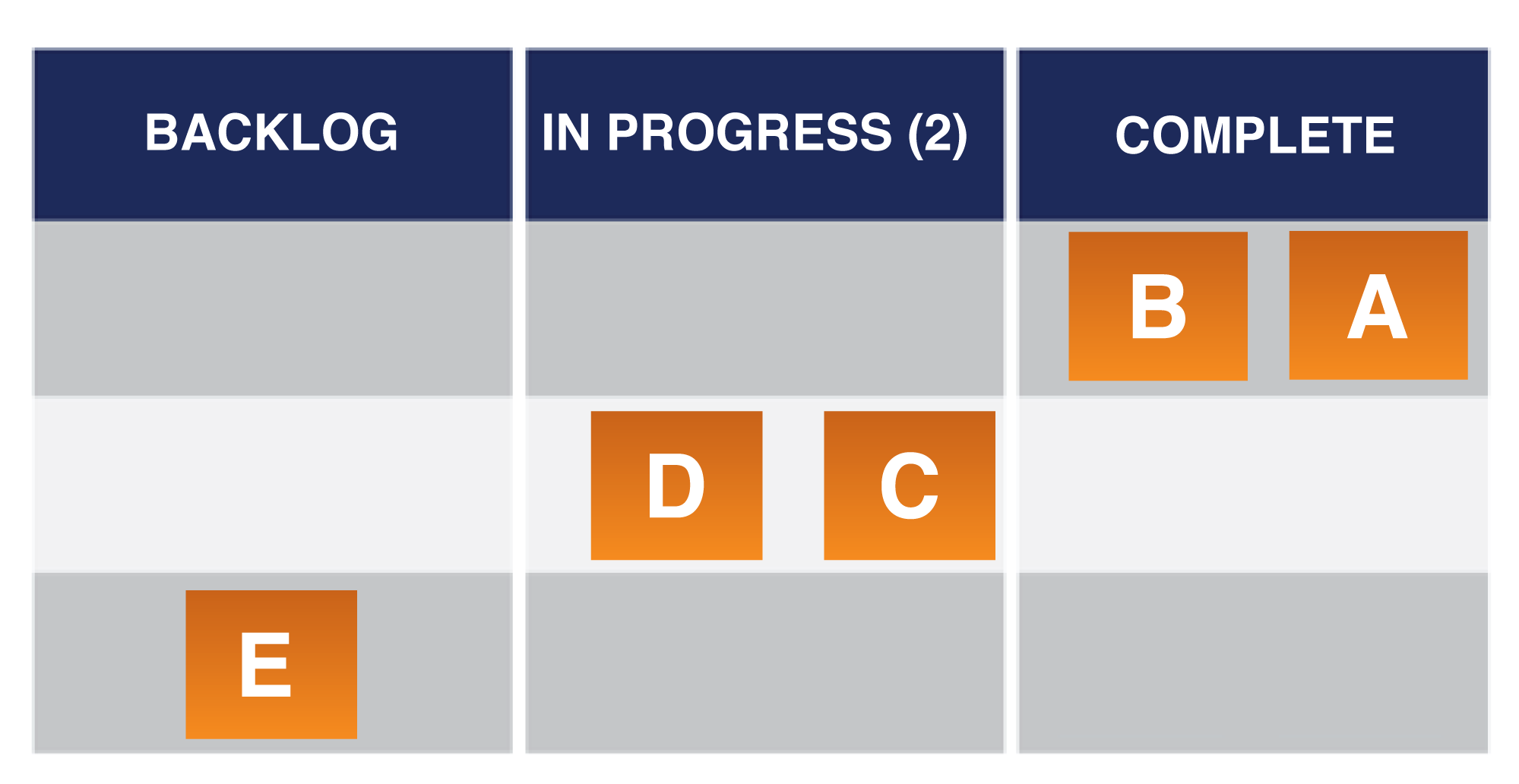
Figure 16 Kanban Board for Tasks
The Cumulative Flow chart shows the number work items in each state, versus time. Figure 11 shows a Cumulative Flow chart for the flow of artwork for computer games, in which work items (drawings) move through Outline, Draft, and Final states. This chart also illustrates key performance parameters, namely Cycle Time, Lead Time, Backlog, and Work in Process:
- Lead Time: Elapsed time from the moment when a work item is added to the Backlog, to its completion.
- Cycle Time: Duration of work on work items, from start of work to completion.
- Backlog: The number of work items that are defined and waiting to start.
- Work in Process (WIP): The number of work items on which work is currently being done (across all workflow states).
The Lead Time and Cycle Time for a specific work item may differ significantly from the average. The average Lead and Cycle Times for the Kanban process can be read directly from the Cumulative Flow chart, as shown in the example. The lengths of the horizontal arrows show the average Lead and Cycle Times as of a particular date (i.e., the position of the right arrowhead). The size of the Backlog and Work in Process can be read from the chart for any date, as illustrated by the vertical arrows.
The goal of a Kanban process is to maximize the throughput, which is the number of work items completed per day. Throughput, Cycle Time, and WIP are related by Little’s Law, which states
Throughput = WIP / Cycle Time
Little’s Law seems to show that throughput can be increased by increasing WIP and decreasing Cycle Time. However, while the formula correctly shows the relationship between the average values, as they might be inferred from a Cumulative Flow chart, it can be misleading as a guide to optimizing Throughput. In reality, for Team of specific size and membership, increasing WIP from zero while holding Cycle Time constant produces an increase in Throughput as Team-member idle time decreases, but Throughput peaks when idle time drops to a negligible value. Increasing WIP beyond this point results in work items sitting idle in workflow states, or in Team members having to multi-task across the items, which reduces efficiency and Throughput.
Once the WIP Limits have been optimized, the only other way to increase Throughput is to decrease Cycle Time, which means finding ways to get work done more quickly.
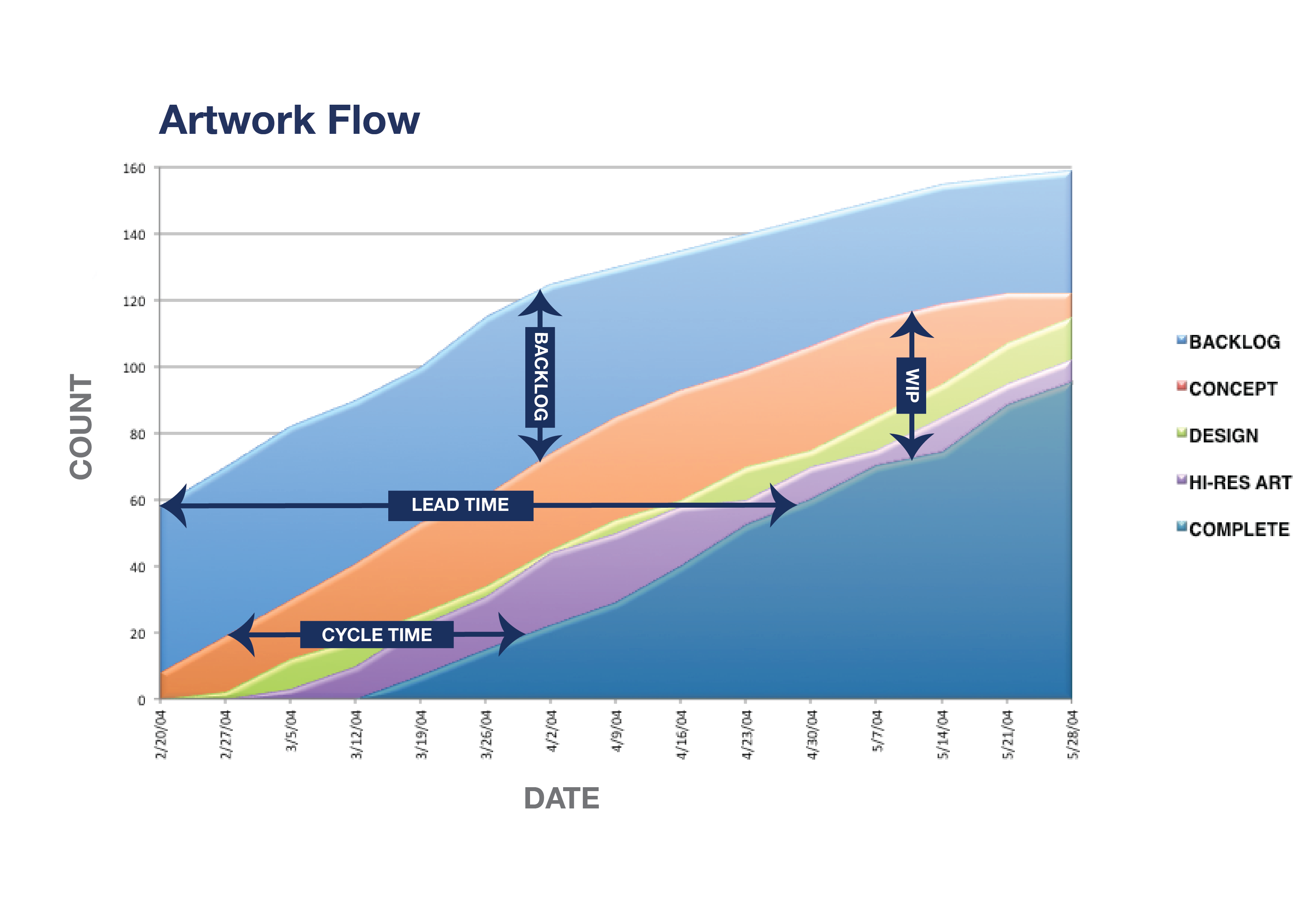
Figure 17 Cumulative Flow Diagram for a Kanban Process
The Taskboard and Cumulative Flow chart provide effective insight into how well work is proceeding, at the detailed and aggregate levels, respectively.
10.1.2.5 Governance Points
Governance is exercised in a variety of ways, by different people at different points. Table 6 shows typical governance points for a Kanban process at the Project level.
|
WHEN |
PARTICIPANTS | DECISIONS AND ACTIONS |
| Backlog Refinement Meeting | Team, Backlog Owner | Team provides guidance on quality and completeness of Backlog Items, technical "holes," other work that is required but not yet in the Backlog, and dependencies. Backlog Owner revises requirements based on this input. |
| Backlog Owner decides how work will be ranked (sequenced), based on value and dependencies. | ||
| Daily Stand-Up Meeting | Process Master, Backlog Owner, Team | All Roles collaborate to decide who will follow up to address issues raised in this meeting. |
| Retro-spective Meeting | Process Master, Backlog Owner, Team | All Roles decide how to improve their process and environment, through policy decisions and follow-up actions. |
| Per Backlog Item | Team | Team collaborates with Backlog Owner and/or requesters as needed to complete the work successfully. Team ensures that all work required to meet the Definition of Done is completed. Team also demonstrates deliverables to the Backlog Owner, delivers them to the requesters, or both. |
| Backlog Owner | Product Owner collaborates with Team during their work on deliverables, to ensure deliverables are as desired. | |
| Continuous | Process Master | Process Master does whatever is needed to make the Team as productive as possible. Process Master monitors metrics and tracking system, attends and facilitates Kanban ceremonies, and talks informally with Team members and Backlog Owner to ensure that what needs to be done, is done. |
| Backlog Owner | Backlog Owner manages requests for work (i.e., the Backlog Items) from requesters, revises Backlog Items, and defines their ranking, based in part on insights from Backlog Refinement and unstructured collaboration with Team members. | |
| Team | Team members write Backlog Items for necessary work that is not already in the Backlog, such as infrastructure, research, refactoring, etc., based in part on insights from Backlog Refinement and unstructured collaboration with Product Owner. |
Table 6 Project-Level Governance Points for a Typical Kanban Process
10.2 The Training Business Unit
All ten of the development Teams in the Training BU follow the Scrum process, and have synchronized three-week Sprints, but there are some variations between the Teams.
The Training BU is spread across four geographic locations: Two in the US (San Jose, California and New York, New York), one in the UK (London), and one in India (Bangalore). The ScrumMasters and Product Owners are physically present in these offices, as shown in the table:
| SCRUMMASTER | LOCATION | PRODUCT OWNER | LOCATION |
| SM1 | San Jose (SJ) | PO1 | San Jose (SJ) |
| SM2 | New York (NY) | PO2 | San Jose (SJ) |
| SM3 | London | PO3 | London |
| SM4 | San Jose (SJ) | PO4 | San Jose (SJ) |
Table 7 ScrumMasters and Product Owners for the Training BU
A series of acquisitions and re-organizations have led to a haphazard and unplanned scattering of people around the globe. In addition, this BU decided early on to do major development in the San Jose, California headquarters but have all Quality Assurance work done in Bangalore, India. This policy evaporated over time, due in part to acquisitions, but left a legacy of QA focus in the Bangalore office.
| TEAM | SAN JOSE | NEW YORK | LONDON | BANGALORE |
| 1 | Dev, QA, SM1, PO1 | |||
| 2 | PO2 | Dev, QA, SM2 | ||
| 3 | Dev, QA, SM3, PO3 | |||
| 4 | SM3, PO3 | Dev, QA | ||
| 5 | Dev, QA, SM1, PO1 | Dev | ||
| 6 | PO2 | Dev, QA, SM2 | ||
| 7 | Dev, SM4, PO4 | QA | ||
| 8 | Dev, QA, SM4, PO4 | |||
| 9 | Dev, SM3, PO3 | QA | ||
| 10 | QA, SM1, PO1 | Dev |
Table 8 Geographic Distribution of Training BU Scrum Teams
Team members have specializations of software engineering (Dev), and Quality Assurance / Testing (QA).
Ideally, all members of the Scrum Team, including the ScrumMaster and Product Owner, are co-located, but only Scrum Teams 1, 3, and 8 satisfy this ideal. The geographic distribution of Developers and QA experts for the other Teams is erratic, and at this time, the Bangalore office has no local ScrumMaster or Product Owner physically present. The management of the Training BU understands that this distribution is undesirable, and intends to improve it over time, but has to function with the distribution as it is for now.
10.2.1 Role Adaptations for Distributed Teams
Training learned quickly that a ScrumMaster’s job cannot be done remotely. Split Teams consistently failed to plan and deliver effectively, for reasons that could not be detected or addressed by a remote ScrumMaster. Training adopted the common practice of designating a local “ScrumMaster Proxy” (SMP) for each location where the ScrumMaster was not present. Thus the New York and Bangalore offices each had one ScrumMaster Proxy. The New York SMP works with Teams 5 and 10, while the Bangalore SMP works with Teams 4, 7, and 9.
The ScrumMaster Proxy fulfills much of the ScrumMaster role, specifically around maintaining situational awareness of what Team members are doing and how the work is going, identifying issues that need to be addressed and ensuring they receive the necessary attention, mentoring Team members, enforcing the process, removing impediments that interfere with the Team’s productivity, and facilitating local Scrum-related meetings.
The main differences between the ScrumMaster and the SMP are that the ScrumMaster is the ultimate arbiter for process issues, has overall responsibility for ensuring that planning and execution proceed effectively, and normally facilitates the Sprint Planning meeting. However, the boundaries are blurry, and in practice the interaction between SM and SMP is very close and collaborative.
10.2.2 Conduct of Team Meetings
The Teams that are purely co-located simply meet in a local conference room. The geographic distribution of the other Teams makes this kind of meeting impossible, and requires at a minimum the use of teleconference capabilities.
The Sprint Planning meeting is a fast-paced planning session whose purpose is to decide which Stories to implement in a Sprint. It is not practical to conduct this kind of planning piecemeal, and so all Team members for each Team, along with the ScrumMaster and Product owner, attend the Sprint Planning meeting. The time-zone differences make universal attendance at Sprint Planning unpleasant for some, but Teams minimize the sacrifice of personal time at awkward hours by alternating meetings times from one Sprint to the next, so that no Team members are always inconvenienced.
During this meeting, the Team estimates each Story by using the “Planning Poker[1]” technique, with units of “Story Points[2]” for the sizing of Stories. Prior to the meeting, the ScrumMaster has estimated the Team’s Velocity (amount of work the Team can complete in a Sprint) for the next Sprint, also in units of Story Points, and then works with the Team in this meeting to determine which of the top-ranked Stories will fit into the next Sprint. (This set of Stories comprises the Sprint Backlog for the Sprint.)
Sprint Planning includes not only the decision about which Stories to implement in a Sprint, but also the creation of a Task Breakdown (list of tasks Team members will perform) for each of the Stories selected. As part of the Task Breakdown work, Team members estimate the Tasks in units of Person-Hours[3]. This is done immediately after the Story-selection for the Sprint.
Table 9 summarizes how the different Teams conduct the various Scrum meetings.
| TEAM | BACKLOG REFINEMENT | SPRINT PLANNING | TASK BREAKDOWN | DAILY SCRUM | SPRINT REVIEW | RETRO-SPECTIVE |
| 1 | Weekly local meeting of PO and Team | All meet locally | All meet locally | All meet locally | All meet locally | All meet locally |
| 2 | Weekly video-conference of PO and Team in common working hours | All meet by video-conference in common working hours | All meet by video-conference in common working hours | All meet by video-conference in common working hours | All meet by video-conference in common working hours | All meet by video-conference in common working hours |
| 3 | Weekly local meeting of PO and Team | All meet locally | All meet locally | All meet locally | All meet locally | All meet locally |
| 4 | Weekly video-conference of PO and Team in common working hours | All meet by video-conference in common working hours | All meet by video-conference in common working hours | All meet by video-conference in common working hours | All meet by video-conference in common working hours | All meet by video-conference in common working hours |
| 5 | Weekly video-conference of PO and Team in common working hours | All meet by video-conference in common working hours | All meet by video-conference in common working hours | All meet by video-conference in common working hours | All meet by video-conference in common working hours | All meet by video-conference in common working hours |
| 6 | Weekly video-conference of PO and Team in common working hours | All meet by video-conference in common working hours | All meet by video-conference in common working hours | All meet by video-conference in common working hours | All meet by video-conference in common working hours | All meet by video-conference in common working hours |
| 7 | Weekly local meeting of PO and SJ Team members | All meet by video-conference at 9 AM PST Thursday before next Sprint | SJ Team members draft Task Breakdowns. Bangalore Team members review, comment, revise their Friday morning. SJ Team members review, respond to comments their Friday morning | Local members meet. SM or SMP takes notes, shares notes with full Scrum Team by email. SM and PO attend remote meetings whenever possible. | SJ Team members, PO meet locally | Local members meet. SM or SMP takes notes, shares notes with full Scrum Team by email. SM consolidates findings, facilitates Team vote re: follow-up actions, and selection of actions and owners. |
| 8 | Weekly local meeting of PO and Team | All meet locally | All meet locally | All meet locally | All meet locally | All meet locally |
| 9 | Weekly video-conference of PO and Team in common working hours | All meet by video-conference in common working hours | All meet by video-conference in common working hours | All meet by video-conference in common working hours | All meet by video-conference in common working hours | All meet by video-conference in common working hours |
| 10 | Weekly video-conference of PO and Team in common working hours | All meet by video-conference in common working hours | All meet by video-conference in common working hours | All meet by video-conference in common working hours | All meet by video-conference in common working hours | All meet by video-conference in common working hours |
Table 9 Scrum Meetings for Distributed Teams
10.2.3 Conduct of Day-to-Day Work
The Teams, Support personnel, and management, all require complete and up-to-date information about every aspect of the application development, including requirements, defects, plans, and work status, and Training has selected VersionOne’s Web application for this purpose.
Team members work closely, swarming on Stories to implement them as quickly as possible, in the rank order specified by the Product Owner. Because Team Members collaborate informally to get the work done, distributed Teams are at a disadvantage compared to co-located Teams, as the quick and informal interactions that are the norm for the latter are not always possible. Instead, members of distributed Teams have to rely more on the written word, communicating with remote members via email, documents stored on Wikis or other shared media, and so forth.
All of the distributed Teams other than Team 7 have overlapping work hours, and arrange their schedules to get the most advantage of the ability to communicate in real time during those hours. They use telephones, chat programs, and shared virtual workspaces as provided (for example) by Sococo’s Team Space product.
Team 7 is a special case, as it is the only Team whose separate locations share no overlapping work hours. The two halves of this Team take special pains to provide written summaries of the day’s work for each other.
The ScrumMasters and ScrumMaster Proxies email or speak with each other every day, to stay on top of events and status.
10.3 The Web Store Business Unit
All fifteen of the development Teams in the Web Store BU follow the Scrum process, and have synchronized two-week Sprints, but there are some variations between the Teams.
The Web Store BU is spread across four geographic locations: Two in the US (San Jose, California and New York, New York), one in the UK (London), and one in India (Bangalore). The ScrumMasters and Product Owners are physically present in these offices, as shown in the table:
| SCRUMMASTER | LOCATION | PRODUCT OWNER | LOCATION |
| SM1 | London | PO1 | London |
| SM2 | London | PO2 | London |
| SM3 | San Jose (SJ) | PO3 | San Jose (SJ) |
| SM4 | New York (NY) | PO4 | New York (NY) |
| SM5 | Bangalore | PO5 | Bangalore |
| SM6 | Bangalore | PO6 | Bangalore |
Table 10 ScrumMasters and Product Owners for the Web Store BU
The Web Store BU has always enforced the policy of having co-located Teams. Thus while Teams are located in different offices, no one Team is split across different offices. Co-location makes the work of Teams much easier, compared to geographic distribution.
| TEAM | LOCATION | SM & PO | MEMBERSHIP | FOCUS |
| 1 | London | SM1, PO1 | Dev, QA | Catalog |
| 2 | Dev, QA | Catalog | ||
| 3 | SM2, PO2 | Dev, QA | Catalog | |
| 4 | Dev, QA | Catalog | ||
| 5 | San Jose | SM3, PO3 | Dev, QA | Inventory |
| 6 | Dev, QA | Inventory | ||
| 7 | Dev, QA | Inventory | ||
| 8 | New York | SM4, PO4 | Dev, QA | Shipping |
| 9 | Dev, QA | Shipping | ||
| 10 | Dev, QA | Shipping | ||
| 11 | Bangalore | SM5, PO5 | Dev, DBA, QA | Data Warehouse |
| 12 | Dev, DBA, QA | Data Warehouse | ||
| 13 | Dev, BI, QA | Reporting & Analytics | ||
| 14 | SM6, PO6 | Dev, QA | Accounting | |
| 15 | Dev, QA | Accounting |
Table 11 Geographic Distribution of Training BU Scrum Teams
Team members have specializations of software engineering (Dev), Database Administration (DBA), Business Intelligence (BI), and Quality Assurance / Testing (QA).
10.3.1 Role Adaptations for Distributed Teams
There are no role adaptations, as all Teams have purely local membership. There is no need for the ScrumMaster Proxy role.
10.3.2 Conduct of Team Meetings
Teams hold all Scrum meetings in local conference rooms.
In the Sprint Planning meeting, the Team estimates each Story by using the “Planning Poker” technique, with units of “Person-Days[4]” for the sizing of Stories. Prior to the meeting, the ScrumMaster has estimated the Team’s Velocity (amount of work the Team is likely to complete) for the next Sprint, also in units of Person-Days, and then works with the Team in this meeting to determine which of the top-ranked Stories will fit into the next Sprint.
Sprint Planning includes not only the decision about which Stories to implement in a Sprint, but also the creation of a Task Breakdown (list of tasks Team members will perform) for each of the Stories selected. As part of the Task Breakdown work, Team members estimate the Tasks in units of Person-Hours. This is done immediately after the Story-selection for the Sprint.
On conclusion of the Task Breakdown work, the ScrumMaster uses the Task-level estimates to confirm whether the concept of Sprint scope derived from Story-level estimates is still appropriate. If it is not (i.e., the Task-Level estimates have produced larger or smaller total effort across the Stories) then the ScrumMaster, Team, and Product Owner revise the scope of the Sprint (Sprint Backlog) up or down, as necessary. From this point on, the Sprint Backlog is set, and scope change requests are not allowed during the Sprint.
10.3.3 Conduct of Day-to-Day Work
The Teams, Support personnel, and management, all require complete and up-to-date information about every aspect of the application development, including requirements, defects, plans, and work status, and Training has selected Atlassian’s GreenHopper Web application for this purpose.
Team members work closely, “swarming” on Stories to implement them as quickly as possible, in the rank order specified by the Product Owner. Team Members collaborate informally to get the work done.
10.4 The WebPortal Organization
The WebPortal Organization (WPO) does not develop software applications, and does not use a Scrum process internally. However, WPO does a lot of internal work relating to the development and maintenance of test, Staging, and Production environments, and often adds new capabilities to these environments. Some of this work is done in order to meet the needs of the upstream Business Units, while some is done to handle growth in usage, evolving security requirements , or internal needs.
WPO’s internal work falls into two categories: Reactive and Predictive.
- Reactive work is done in response to requests for small deliverables that can be accomplished in a few days’ time, from start to finish. While the time from request to start of work may be long, depending on urgency, the time required to accomplish the work, once begun, is small.
- Example: A request to change a security setting on a firewall.
- Predictive work is done in response to requests for major deliverables that require significant planning, expenditure, and/or time to accomplish.
- Example: A request to purchase, install, and configure several database servers for the Production environment, to support a new data-warehouse capability.
WPO’s Reactive work tends to require only one or two people per request, in most cases. The requests often involve highly-specialized work that few people, or perhaps only one person, in WPO can perform. The size of the requests and the specialized nature of the work imply that a Team orientation is not appropriate, as there is no practical way to partition the work among a group of people. For all of these reasons, Kanban is a more appropriate process for the work than Scrum.
WPO’s predictive work is performed via the classic model of Project Management. A Project Manager is assigned to the project, and WPO allocates people to the Project Team as required to execute the project successfully. Projects may span weeks or months, depending on scope, but are capped at a maximum of six months. Larger initiatives are considered to be Programs, whose work is split across multiple Projects, with a Program Manager being responsible for coordination between Projects.
10.4.1 Conduct of Team Meetings
The WebPortal Operations Team is co-located, which simplifies meetings and the conduct of work compared to distributed organizations.
The only standardized meetings are those relevant to Reactive work, which is managed by a Kanban process. The Daily Standup and Backlog Refinement meetings are held back to back, in that order, with the Backlog Owner, Process Master, and Team members attending both. The Director of Operations fulfills the role of Backlog Owner, while a full-time employee whose title is Project Manager carries out the responsibilities of the Process Master. These meetings are held close to the wall where the Kanban Taskboard and Cumulative Flow chart are posted, so that everyone can see and discuss the current status of work.
The paired meetings starts with a review of requests at the top of the Backlog, both to clarify Team understanding and to identify which items will start within the next 24 hours, and which Team members will begin work on those items. After this discussion, the attendees move into the Daily Stand-up meeting to bring everyone up to speed on current progress and plans for the next day, as well as to highlight issues that require resolution. The group decides who will follow up to resolve any such issues after the meeting.
Major efforts (which are typically funded individually) are treated as one-off projects, and tend to have unique characteristics that are less well-suited to recurring ceremonies than are other styles of work. The only standard ceremonies for such projects are Stand-up meetings, which are held locally, but typically twice per week, rather than daily. The relevant Project Manager facilitates these meetings, which are attended by a mix of local employees, and (as needed) local or remote contractors.
10.4.2 Conduct of Day-to-Day Work
Team members collaborate informally, to complete work items quickly. The “Swarming” strategy used by software development teams tends to be less effective for Operations work, as work items are often small things requiring a skill that only one Team member possesses. The result is that the majority of items are handled by individuals, rather than swarms of Team members.
Team members do update the status of work items on the Kanban Taskboard, moving them from Not Started, to In Progress, to Complete, as appropriate. The Not Started column typically contains the top few items from the Backlog which are likely to begin in the next few days, and the Backlog Owner adds items to it every day or two.
11 DISCOVERIES
Each recipe provided in the preceding sections may be thought of as a pattern. The term pattern refers to a reusable solution to a particular type of problem, at a level detailed enough to drive implementation of the solution, but without specifying all details of the solution. (E.g., a pattern is less detailed than an algorithm.) The term arose first in architecture,[11] and was quickly adopted by pioneers in object-oriented programming.[12]
The recipes described above encompass a number of patterns for the conduct of governance. These recipes span all levels, from Project to Portfolio, and make use of a variety of metrics and artifacts. While the individual recipes described here are useful, they do not attempt to cover all possible situations. Other environments with different kinds of products will have their own distinct challenges, and require recipes that address those challenges. Thus it is important to understand the principles that lead to the creation of effective recipes for governance, as well as the anti-patterns that generate, rather than resolve, impediments. We will now look at some principles and anti-patterns that can be inferred from our discoveries.
11.1 Principles of Agile Governance
By principles, we mean characteristics that are common across our recipes for effective governance. Understanding these principles of governance should make the development of new and effective recipes easier.
We identify the following principles here.
11.1.1 The Standardization of Recipe Elements
We see a common structure across governance recipes, in that they may be defined in terms of five basic elements:
- Roles: A Role defines areas of responsibility and authority associated with different aspects of governance. People who fulfill these Roles collaborate with others in the process of making decisions, but have specific areas of authority that are theirs alone, and not shared with any other people or Roles. This authority is typically constrained by checks and balances (often in form of other Roles with other types of authority) so that no one person can rule in an autocratic fashion, but also cannot be overruled by others. This conception of Roles provides
- clarity, in terms of which people are the sole sources for certain types of information or decisions,
- decisiveness, by avoiding “rule by committee” which can otherwise produce endless debate and little action
- Ceremonies: Ceremonies are recurring meetings, with specific and standardized agendas, attendance, and practices. Each ceremony has a particular purpose (addressed in more detail in Section 11.1.3).
- Artifacts: Different artifacts serve different purposes, but most decisions make use of artifacts to some degree.
- Tracking and Metrics: Tracking performance of work against plans is important, because without tracking, the actual deliverables and delivery dates may have little in common with the needs we are attempting to address. Tracking always involves the collection of status information, the creation of useful metrics that depend on this information, and comparison of the metrics to the planned or desired values. Effective tracking enables swift detection of problems and speeds their resolution, while ineffective tracking does the opposite. In some cases, the information provided by tracking may provide information that leads to large changes in direction, or even cancellation of planned work.
- Governance Points: A governance point is a moment at which someone who fulfills a particular Role makes a decision in the domain of that Role’s authority, based on standard practices, metrics, and artifacts. Many Governance Points are Ceremonies, but some occur on the fly, as needed.
11.1.2 Common Role Types
Roles may be defined for any purpose, but we see some recurring types of Roles associated with groups of people who collaborate to complete deliverables. The sets of Scrum and Kanban Team- and Program-level Roles are very similar, and contain the following Role types:
- Defining requirements to be implemented: Team and Area Product Owners, Backlog Owner
- Enforcing the process, tracking and facilitating progress: ScrumMaster, Kanban Master, Program Manager
- Doing the hands-on Work: Scrum Team, Team
It appears that a process-oriented role is necessary whenever a group of people creates deliverables that are destined for customers (whether external or internal).
In contexts focused purely on decision-making, the process responsibilities may reside with the decision maker, as the focus is on providing the latter with information required to make decisions.
11.1.3 Categories of Governance Points
We see similar categories of governance activities at all levels of governance.
- Develop Specifications: We refer here to specifications of deliverables, which will be of use later in the process. (Examples include Stories and Business Cases.) A specific Role always owns the responsibility to develop the specifications. The work of development frequently involves a refinement process, which solicits feedback and assistance from key participants who will ultimately be involved in the implementation of the specifications.
- Rank Deliverables: The concept of “in-scope or out-of-scope,” familiar from classical project management, is replaced by the concept of ranking (sequencing) the implementation of deliverables. Scope is then determined by which set of deliverables can be implemented in a particular period of time, in contrast to the classic perspective of defining the scope and then estimating the time required to deliver it. Ranking is driven primarily by some conception of value, but also constrained by dependencies. The deliverables may be large (coarse-grained, or large Epics), as at the Portfolio level, or small (fine-grained, or Stories), as at the Project level.
- Plan Implementation: Planning goes beyond Ranking to forecast completion of deliverables against a schedule. In high-uncertainty contexts (such as software development), plans are useful tools but not reliable predictors of the future. What plans actually do is organize work to maximize the value that can be delivered in a specific period of time. The work of planning has these parts:
- Estimate the size of the ranked deliverables
- Estimate the capacity of a Team or set of Teams to complete work in a specific period of time, such as a Release cycle
- Select the subset of the ranked deliverables that can be completed in, and delivers the most value from, the specified period.
- Decompose the planned deliverables into finer-grained items, if appropriate, and re-plan if new estimates for finer-grained items shows that the previous concept of scope is not appropriate for the specified period.
- Perform Implementation: Team members develop and validate deliverables in Rank order. They use a Swarming strategy to minimize the calendar time required to complete each deliverable. The Team plans and executes work in a way that ensures that each completed deliverable is consistent with the relevant Definition of Done.
- Monitor Status of Work: Monitoring includes collecting status information in order to prepare useful metrics, comparing metrics to the plan, and identifying how best to respond to discrepancies between reality and the plan.
This approach minimizes the risk of not finishing deliverables, and maximizes flexibility by minimizing Work-in-Process, thus enabling large changes in direction by minimizing the cost of disruption to ongoing work.
The above categories somewhat resemble the five process groups of Project Management as defined by the Project Management Institute, i.e. Initiating, Planning, Executing, Monitoring and Controlling, and Closing. The major differences between the PMI Process Groups and the above list are
- While the Planning Process Group addresses the development of requirements, it does so in a very cursory fashion. Much of the machinery of Agile processes (such as Backlog Refinement) addresses the development and prioritization of requirements, making this work a seamless part of the overall process.
- The Initiating and Closing Process Groups have no direct correspondents in the Agile processes, as the notion of starting and ending a project does not map directly to Agile processes, whose focus is on developing value incrementally over time through continuing work.
11.1.4 “Good Enough” is Good Enough
Attempts to estimate value, scope, or effort of a deliverable reliably will fail. It is simply not possible to estimate these things with any accuracy when producing something that is new. It is possible to estimate these things reliably when work is repetitive (as, for example, when building the same server configuration repeatedly), but not when the goal is to produce something that is not close to being a duplicate of something that has been done before.
The goal of estimation, therefore, should be to produce a number that is good enough to meet the immediate needs, and no better. Typically, these numbers are subject to large errors (factors of two are common, and factors of ten are not unknown), so it is just as important to have a process that can adapt well to the unreliability of estimates as it is to get adequate estimates. The Agile processes (e.g., Scrum, Kanban, eXtreme Programming) all assume that estimates are unreliable, and therefore focus on adapting well to unexpected developments, as well as on planning for what can be understood.
Given that reliable estimates will not generally be obtainable, the goal of estimation should be to produce an adequate estimate quickly, rather than a much better one. The cost of “better” may be the expansion of an estimation exercise from ten minutes to ten days, and is seldom worth paying. Instead, we choose a number from a coarse set of possible values (such as the Fibonacci sequence), and focus more on rapid convergence to some number rather than on attempts to refine it.
This approach works well enough in practice because
- It is a realistic response to genuine limitations of our knowledge, and is therefore achievable
- We can refine our estimates by repeating them at successively finer levels of granularity, over time, as needed
11.1.5 Granularity
Classic attempts at planning Portfolios and Projects often assume that reliable information about value, scope, and effort associated with deliverables is available. Given reliable information, we can
- Decide what to do (i.e., what deliverables to produce)
- Determine the effort, duration, and resources required to deliver according to the plan
However, in high-uncertainty contexts, our understanding of deliverables is always crude, and subject to large errors (factors of two are common, and factors of ten are not unknown). These statements are equally true of portfolio-level Business Cases, and Project-level Stories.
As neither precision nor details are available, we must plan based on crude information, using simple criteria and coarse estimates. This shift in how planning is done includes the key concept that estimates used for decision-making about what to do are separate from the estimates that we use to plan the schedule of work.
- The decision about what to do is replaced the decision about how to rank deliverables. These decisions are based on very rough estimates, using coarse scales (such as the Fibonacci scale). This works because the decision about ranking a set of items requires only an understanding of the relative value or ROI of the items with respect to each other, not the actual, real-world (absolute) values.
- The determination of effort and duration becomes more reliable as the granularity becomes finer and the time scale becomes shorter. The effort of Stories can be estimated more reliably than the effort of Epics, and the estimates of how much work a Team can do in a Sprint is more reliable than the estimates of how much work a Team (or set of Teams) can do in a Release.
The approach, then, is to make quick ranking decisions at high (Portfolio) levels, which then provide guidance about which initiatives deserve the investment of effort associated with Release planning and Roadmap development. The cost of Release planning is substantial, as it can involve many Teams’ dedicated effort across one to several days, so care should be taken to understand the value and need of such planning before allocating the time for it.
A similar logic applies to the planning and implementation of Stories at the Team level. Uncertainty remains large even at the small scope of a Story, so we employ the same techniques for the short-term planning of Sprints as we do at the Portfolio level.
11.1.6 The Definition of Done
A naïve view of “doneness” for a deliverable is that it satisfies the acceptance tests created to validate its characteristics. In practice, however, there is more to “being done” with the work associated with a deliverable than the simple concept of validation.
A Definition of Done can be thought of as policies that define the exit criteria for a deliverable, which must be true aside from the latter’s specific acceptance tests. The term originated with Agile processes, but the concept is useful in general.
A major benefit of having a Definition of Done is that it makes handoffs easier, by defining and enforcing contracts that spell out what has been done. It ensures that a Team or organization has done everything that is useful and accomplishable, in practical terms, for a deliverable, and clarifies what this accomplishment means within the source organization (Section 10.1.1.3.1). If the deliverable will be handed off to another organization for use (as for a Release), then the Definition of Done for the source organization should incorporate the entrance criteria defined by the receiving organization.
11.1.7 Handoffs
Handoffs occur in many places (e.g., Product Owners hand off specifications to Team members, who will implement them; Business Units hand off applications to the WPO, which will deploy them). As detailed in Section 9.2.4, the common conception that a handoff can be accomplished by transferring information in one direction (e.g., by filling out a form) is often naïve and ineffective. Complex handoffs are better handled as processes that involve discovery over a period of time.
11.2 Anti-Patterns
Anti-Patterns are patterns of behavior that are counterproductive. They impede success, or contribute to failure. Anti-Patterns of interest here are those that contradict the principles we have described in the preceding sections. This section lists a set of common Anti-Patterns.
11.2.1 Making Big Things, instead of Little Things
Common down-sides of Waterfall-style software projects include
- Elapsed time from request to delivery of feature is too large to enable organization to be responsive to urgent customer needs and changes in business environment
- Change requests for urgent needs cannot be implemented, or are disruptive to schedule and productivity
These problems are linked to the practice of implementing large and monolithic scope definitions, and are alleviated by the Agile approach of building small increments of functionality, quickly, in short iterations or Sprints.
When an organization that uses a process like Scrum does build large things (which is very common), it does so by dividing the large scope into small pieces, and then building and validating each small piece quickly. This approach enables rapid changes in direction when business needs so dictate.
11.2.2 Driving Resource Decisions by Projects, instead of Teams
Changing a Team’s membership disrupts the Team and impairs productivity. The classical conception of project management assumes that a Project Team is assembled for a specific project, and then disbanded when the work is complete. Applying this way of thinking to software projects leads to frequent Team membership changes based on transient needs, or to re-definition of what Teams mean with every Release. The result is that Team members do not work together long enough to become highly productive.
It is better to have persistent Agile Teams, such that each Team has a focus is in a specific application domain. Projects may come and go, from a Portfolio perspective, but Team definition and funding should be stable, and change only slowly over time.
11.2.3 Separating Estimators from Implementers
The people who are best able to estimate the effort of creating a particular deliverable are the ones who will be doing the work. For this reason, Agile processes favor having the development Teams perform estimates of their work, when planning for the near future. This linkage may be relaxed when doing Portfolio Planning, which does not require (and cannot get) accurate estimates, but even there some involvement of the development personnel is beneficial.
11.2.4 Demanding Accuracy of Effort and Schedule Estimates
To repeat a point that has been made multiple times, accurate estimates are not possible when the deliverables are not simply repetitions of previous work.
11.2.5 Demanding Scope on Time
Delivering the planned scope on time has long been a definition of success for classic projects, but is much less valuable when applied to environments where scope not only cannot be understood very well in advance, but is subject to frequent change as the business environment changes.
A better metric for success of Agile projects is to maximize the delivery of value over time, and thus be able to change directions (and scope) swiftly when business drivers change.
11.2.6 Governance by Committee
The main problem with having a committee make decisions isn’t just that it is slow (although it usually is), but that consensus may be impossible. Even when participants believe they have achieved consensus, they may exit the meeting with different beliefs about what the decision was, and leave confusion in their wake as they communicate results to others. Finally, if two or more people attempt to provide guidance to (say) a development Team, the results may be a disaster if they cannot reliably provide the same answers to the same questions.
For all these reasons, Agile processes typically define decision makers, with different areas of responsibility, by defining Roles. A person who fulfills a particular Role generally does collaborate with many different people, but ultimately provides definitive guidance about decisions to those who need it. This way of working provides for swifter decision-making and more consistent guidance.
11.2.7 Handoff by Form
It is not that handing off deliverables from one organization to another by filling out a form never works, but that it seldom works when complexity or the pace of change is high.
11.2.8 Parallelizing Initiatives and Projects
A common practice in many organizations is to respond to requests from stakeholders with strong personalities by prioritizing all of their requests as “urgent.” The result is a high degree of concurrency across multiple parallel initiatives, and a very slow rate of progress for all of them.
The inefficiency is worse than a naïve model would suggest. While one might think that two independent initiatives, done in parallel, by the same people would simply halve the rate of progress for each, the reality is that the context-switching experienced by the development Team members exacts a significant cost, and slows progress further. The result of parallelizing many unrelated initiatives is snail-like progress for all, and a substantial reduction in productivity or time-to-market compared to working on them sequentially.
For the above reasons, Agile processes favor serializing work (i.e., initiatives, Stories), and maximizing the resources applied to each to complete it as quickly as possible. This style of working not only achieves higher throughput, but is usually better for Team morale.
11.2.9 Measuring Progress by Proxy
The best measurement of progress is based on completed deliverables. Other methods, such as percent done for tasks, or progress bars on Gantt charts, are harder to interpret, and more prone to error. (The notorious—and common—experience of seeing tasks that are 90% done for long periods of time testifies to this observation.)
For these reasons, metrics such as Burn-Up charts (for Releases) and Burn-Down charts (for Sprints) are more commonly used in Agile projects, as they show progress on deliverables.
11.2.10 Failure to Finish
It is common to discover integration problems between application modules built by different Teams that could have been prevented by a consistent Definition of Done. It is worth taking some time to think through, document, propagate, and revise Definitions of Done to head off such problems.
12 CONCLUSION
The use of a synthetic case study to highlight effective governance practices for large organizations that use Agile processes allows us to accomplish two things:
- Present recipes for specific types of governance relevant to common problems faced by large organizations, especially in the context of building enterprise-level Web sites from the combined efforts of many Business Units
- Identify common principles for effective governance recipes, which should aid in the creation of new recipes for governance scenarios not addressed here
Perhaps the biggest problem in governance is simply the dearth of widely-useful and generally-understood practices that are relevant for large enterprises. We attempt to address that problem by providing some practical guidance about how to conduct governance.
Footnotes
-
PLANNING POKER® is a reg. trademark of Mountain Goat Software, LLC ↑
-
Story Points are used with the relative sizing approach to estimation. The Team has a set of standard Story sizes (typically the Fibonacci sequence), and selects initial reference Stories to define what a size of 1, 2, 3, 5, etc. Story Points means. The number is intended to indicate the complexity of Stories, with the expectation that the effort of implementation is roughly proportional to the size of the Story. The Team estimates a Story by identifying which of the reference Stories it most resembles, in terms of complexity. ↑
-
A Person-Hour means an hour of work by one person. A Task that one person works on for six hours, or two people work on for three hours each, consumes six Person-Hours in either case. A Person-Hour is a unit of effort, not duration (elapsed time from start to end of work), and should not be confused with duration. ↑
-
Person-Days are used with the absolute sizing approach to estimation, with one Person-Day defined to be eight Person-Hours. The Team estimates the total effort for implementing a Story, where effort means the total time spent working on a Story by all Team members. Thus if one person spends five hours working on a Story, and a second spends three, the total is eight Person-Hours or one Person-Day. Note that there is no direct link between effort and duration (elapsed from start to finish of work on a Story). Teams do not (and should not) estimate duration, as duration is not needed or relevant for Sprint planning. ↑
Notes
-
“Building Effective Approaches to Governance,” Nonprofit Quarterly. Published March 4, 2013 (written 21 June 2002). http://www.nonprofitquarterly.org/governancevoice/113-building-effective-approaches-to-governance.html ↑
-
Manifesto for Agile Software Development. February, 2001. http://agilemanifesto.org/. ↑
-
The Scrum Guide. Ken Schwaber and Jeff Sutherland. October, 2011. ↑
-
Kanban and Scrum: Making the Best of Both. Henrik Kniberg and Mattias Skarin. C4Media. 2010. ↑
-
“The Agile PMO,” by Kevin Thompson ↑
-
A Guide to the Project Management Body of Knowledge (PMBOK® Guide), Fourth Edition. Project Management Institute, Inc. 2008. ↑
-
The Standard for Program Management, Second Edition. Project Management Institute, Inc. 2008. ↑
-
The Standard for Portfolio Management, Second Edition. Project Management Institute, Inc. 2008. ↑
-
Practices for Scaling Lean & Agile Development, by Craig Larman and Bas Vodde. Addison-Wesley. 2010. ↑
-
The ScrumMaster Study Guide, by James Schiel. CRC Press. 2011. ↑
-
A Pattern Language: Towns, Buildings, Construction, by Christopher Alexander. Oxford University Press, USA. 1977. ↑
-
Design Patterns: Elements of Reusable Object-Oriented Software, by Erich Gamma, Richard Helm, Ralph Johnson, and John Vlissides. Addison-Wesley. 1944. ↑